
Problem Create ANE,ArgumentError: Error #3500: The extension context does not have a method with the name
I little confuse about build ANE, I already follow all the direction, but the error always #3500 when I try to call the ANE.
I create ANE using java android.
The tools I use : Flash Builder running on Win-64 win.7. I think I must straight to the point, here what i made it first step by step;
1. I create the JAVA application first, with package senigo.extension.android then I create 3 file, Sample.java, SampleContext.java, PassTextFunction.java
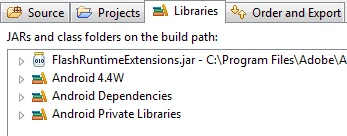
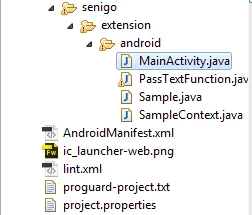
Sample.Java Source Code
package senigo.extension.android;


import android.util.Log;
import com.adobe.fre.FREContext;
import com.adobe.fre.FREExtension;


public class Sample implements FREExtension {
  @Override
  public FREContext createContext(String arg0) {
  // TODO Auto-generated method stub
  Log.i("Sample", "createContext");


  return new SampleContext();
  }
  @Override
  public void dispose() {
  // TODO Auto-generated method stub
  Log.i("Sample", "Dispose");
  }
  @Override
  public void initialize() {
  // TODO Auto-generated method stub
  Log.i("Sample", "Initialize");
  }


}
SampleContext.Java Source Code
package senigo.extension.android;


import java.util.HashMap;
import java.util.Map;
import android.util.Log;
import com.adobe.fre.FREContext;
import com.adobe.fre.FREFunction;


public class SampleContext extends FREContext {
  public SampleContext()
  {
  Log.i("SampleContext", "constructor");


  }
  @Override
  public void dispose() {
  // TODO Auto-generated method stub
  Log.i("SampleContext", "dispose");
  }
  @Override
  public Map<String, FREFunction> getFunctions() {
  // TODO Auto-generated method stub
  Log.i("SampleContext", "getFunctions");
  Map<String, FREFunction> functionMap = new HashMap<String, FREFunction>();
  functionMap.put("passText", new PassTextFunction());

  return functionMap;
  }


}
PassTextFunction.Java Source Code
package senigo.extension.android;


import com.adobe.fre.FREContext;
import com.adobe.fre.FREExtension;
import com.adobe.fre.FREFunction;
import com.adobe.fre.FREObject;


public class PassTextFunction implements FREFunction {


  @Override
  public FREObject call(FREContext arg0, FREObject[] arg1) {
  // TODO Auto-generated method stub

  FREObject result = null;
  try{
  result =  FREObject.newObject("Hello World");

  }catch(Exception e)
  {

  }
  return result;
  }


}
after all the file I create the jar file using click right on the tree view >> Export >> Jar File >> Sample.Jar (i already create jar file that just contain the src folder and after i frustrated, i create .jar file contain all the whole project folder but still didn't work out).
Ok, After that I create project Flex Library Project, That's contain the actionscript to call the native and the extension.xml, here the code.
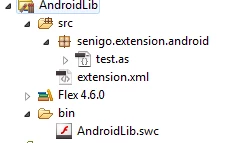
Test.as Source Code, FYI : i already create public function and the static function the error still same #3500.
package senigo.extension.android
{
  import flash.external.ExtensionContext;

  public class test
  {
  private static var extContext:ExtensionContext = null;

  public function test()
  {
  trace ("Test Constructor");

  if (!extContext)
  {
  initExtension();
  }
  }
  public static function get passText():String
  {
  trace ("Test Pass Text");
  if (!extContext)
  {
  initExtension();
  }
  return extContext.call("passText") as String;
  }


  private static function initExtension():void
  {
  trace ("Vibration Constructor: Create an extension context");
  extContext = ExtensionContext.createExtensionContext("senigo.extension.android", null);
  }


  }
}
extension.xml source code
FYI: in Flex when i put the Native Extension, they said must have Windows-x86 so I already create 3 ANE, that just contain Android-ARM , Contain Android-ARM and Default, Contain Android-ARM,Default and Windows-x86 but the error still same. I didn't got it where is the error.
<extension xmlns="http://ns.adobe.com/air/extension/3.1">
  <id>senigo.extension.android</id>
  <versionNumber>1.0.0</versionNumber>
  <platforms>
  <platform name="Android-ARM">
  <applicationDeployment>
  <nativeLibrary>Sample.jar</nativeLibrary>
  <initializer>senigo.extension.android.Sample</initializer>
  <finalizer>senigo.extension.android.Sample</finalizer>
  </applicationDeployment>
  </platform>
  <!-- <platform name="Windows-x86">
  <applicationDeployment>
  <nativeLibrary>sample.jar</nativeLibrary>
  <initializer>senigo.extension.android.Sample</initializer>
  <finalizer>senigo.extension.android.Sample</finalizer>
  </applicationDeployment>
  </platform>
  -->
   <platform name="default">
<applicationDeployment/>
</platform>
  </platforms>
</extension>
After I create it, I copy the .swc file and extension file sample with the Sample.jar file.
I extract the .swc file, copy the library.swf to folder Android-ARM,Default,Windows-86 and I create build.bat that contain the command like this
adt -package -storetype PKCS12 -keystore senigo.p12 -storepass l10nk1ng -target ane senigo.extension.android.ane extension.xml -swc AndroidLib.swc -platform Android-ARM -C ./Android-ARM/ . -platform default -C ./default/ .
the I put the ane to Flex mobile project that I created:
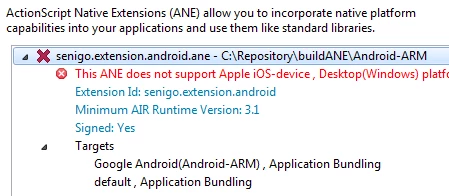

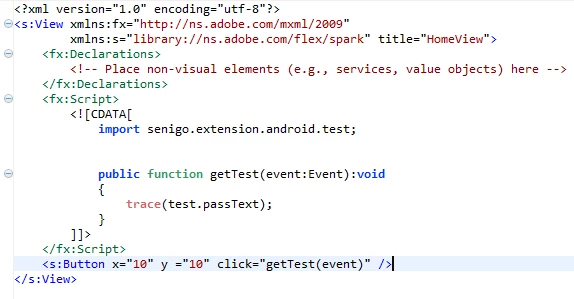
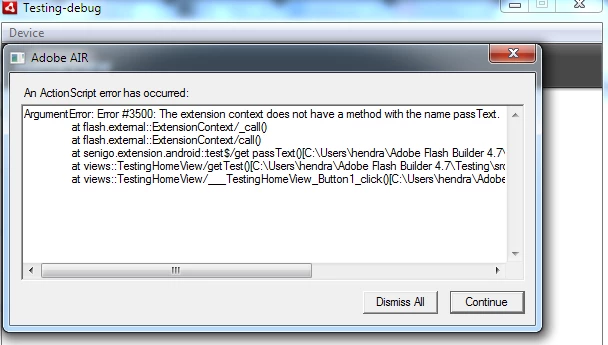
I run it but got error #3500, I really confuse?? what's wrong with my code? is there something I wrong or I Miss it?
Please any one help me.. and when is already ane file can I debug it in Flex Mobile Project? I wanna looks the log.i code that i wrote but i confuse how to looking up in flash builder.
at the end, I wanna said Sorry if my english not very goods, and thanks, because wanna see my problem and thank you very much if You can gave me a solution's


 AdChoices