


Participant
October 31, 2010
Answered

Problem with Air for android connect sqlite?

  • October 31, 2010
  • 1 reply
  • 2480 views

I found sample use air connect sqlite from this website http://www.flashmove.com/forum/showthread.php?t=34778

I copy that code in  a new Air for Android Templates.

then I tested in desktop was ok.I can do query,update,delete.....

but in Android emulator  was fail.it couldn't connect to my sqlite file.

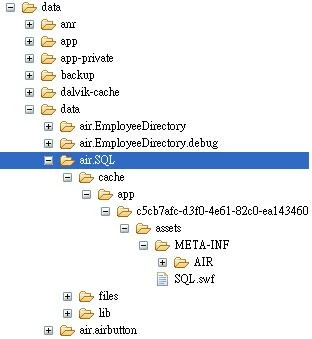
the image below I check my device data  that can't find sqlite file  inside.but I'm sure I pack sqlite file when publish apk. 
can someone tell me how to connect sqlite correctly?Appeciately.

This topic has been closed for replies.
Correct answer Joe ... Ward

First, never use the nativePath property of File.applicationDirectory (as the example does). This isn't supported on Android. You get an empty string. While you could usually bypass the write-restrictions on te application directory using this technique on the desktop, it definitely does not work on Android. Always use URLs rether than native paths to refer to application files.

What you should do is create the database in the applicationStorage directory. You could do this with SQL, or by coping a "template" database file that you packaged with the application from the application directory o the application storage directory (using the URL not the native path, of course.)

1 reply

Joe ... WardCorrect answer
Participating Frequently
November 3, 2010

First, never use the nativePath property of File.applicationDirectory (as the example does). This isn't supported on Android. You get an empty string. While you could usually bypass the write-restrictions on te application directory using this technique on the desktop, it definitely does not work on Android. Always use URLs rether than native paths to refer to application files.

What you should do is create the database in the applicationStorage directory. You could do this with SQL, or by coping a "template" database file that you packaged with the application from the application directory o the application storage directory (using the URL not the native path, of course.)

wan-hongAuthor
Participant
November 8, 2010

Thank you so much.My probelm has solved.

Now I expect you have some CS5 for Android Samples control phone gps or camera.