
Inspiring
June 16, 2015
Answered

Read logs XCode when developing a iOS ANE

  • June 16, 2015
  • 1 reply
  • 771 views

Hi,

I'm developing an iOS library with XCode 6.2 and Intellij for Air Code.

I can debug easily with Intellij, but I'd like to read iOS logs written with NSLog. Stop on breakpoints would be even better.

Right now I'm connecting XCode with Debug -> Attach To Proccess, and seems to work, but it does not stop on breakpoints nor reads logs.

In Android was easy, Catlog app worked just fine. iOS does not seem to have something similar.

Any ideas?

thanks!
This topic has been closed for replies.
Correct answer kheftel

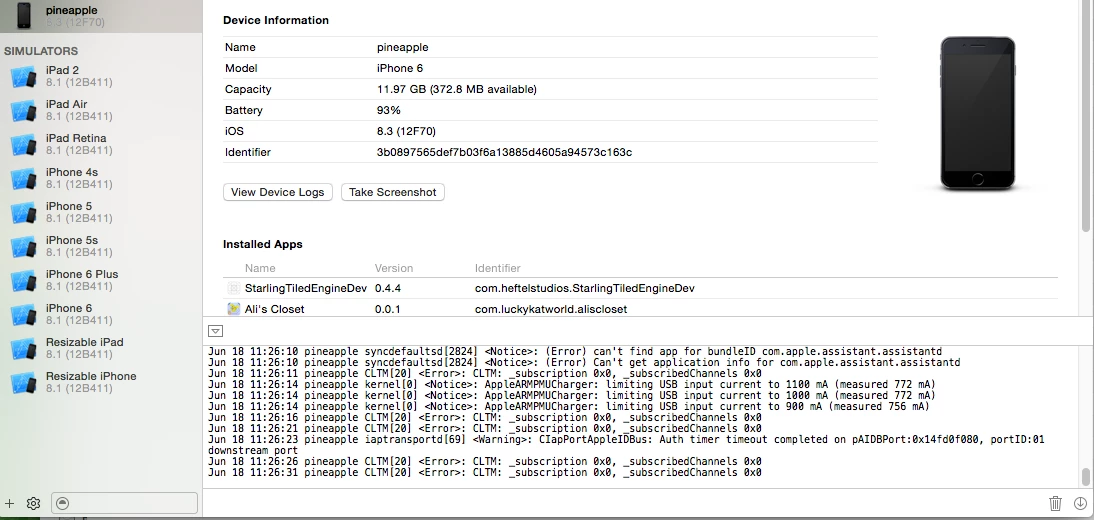
Here's my device window:

If the console pane isn't shown at the bottom, click the arrow in the bottom right to show it.  I believe it's collapsed by default, I had troubles finding it when I first used Xcode.

1 reply

kheftel
Inspiring
June 18, 2015

You can't see the device logs when you plug your device in and select "Devices" (cmd + shift + 2)?

I build apps with Flash Builder 4.7, and the NSLogs from my ANEs show up in XCode when I do that (of course, I can also see all the logs from every other process).

However, how to get XCode to debug/do breakpoints if you're not building/launching the app from XCode.....  I have no idea if that's possible.

Inspiring
June 18, 2015

Xcode 6.2, click on my device -> view device logs  only show Crash logs. Should I do something more or just launch the app should be enough?

About debugging / breakpoints, first I stop the AS3 application with a breakpoint, then go to Xcode and Debug -> attach to process and restart the app from IDE.

Thanks again!

kheftel
kheftelCorrect answer
Inspiring
June 18, 2015

Here's my device window:

If the console pane isn't shown at the bottom, click the arrow in the bottom right to show it.  I believe it's collapsed by default, I had troubles finding it when I first used Xcode.