
Stage3D Performance In Windows
For my app I run Stage3D, When I add more view I get low fps. I use TechPowerUp GPU-Z the GPU usage 100% but cpu usage 10%;
So I test code:
stage.addEventListener(Event.ENTER_FRAME, loop);
stage.framerate = 30;
function loop(e:Event):void
{
Context3D.clear();
Context3D.present();
}
The GPU usage 30%-45%;
Same way I use c++ code follow this:
while(true)
{
PeekMessage(&msg, NULL, 0, 0, PM_REMOVE);
HRESULT hr = device->TestCooperativeLevel();
if(FAILED(hr))return FALSE;
device->Clear( 0, NULL, D3DCLEAR_TARGET, D3DCOLOR_XRGB(0,0,255), 1.0f, 0 );
hr = device->Present( NULL, NULL, NULL, NULL );
Sleep(10);//About FPS is 100
}
The GPU usage 10%
Then I use PIX for windows and capture A single frame like this:
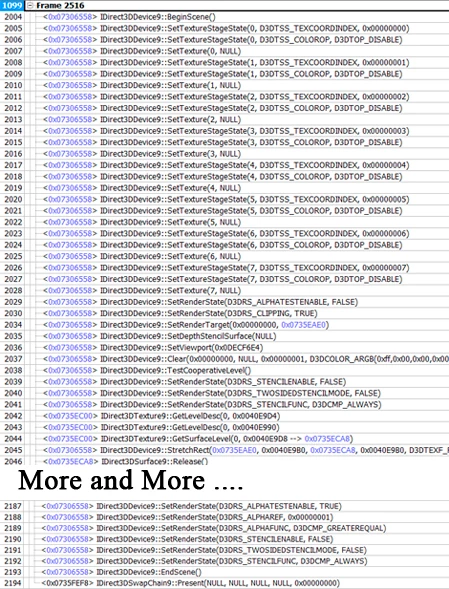
I only wrote two code But stage3D call 190 Direct3D api.
I do not know if this is a key factor affecting performance. But in fact Stage3D is very easy to reach the performance bottleneck.
I do not know what method can be faster and more efficient? Who can help me.


 AdChoices