Inspiring
August 17, 2016
Question

Text deformation (AIR 22.0.0.153)

  • August 17, 2016
  • 1 reply
  • 648 views

Hi

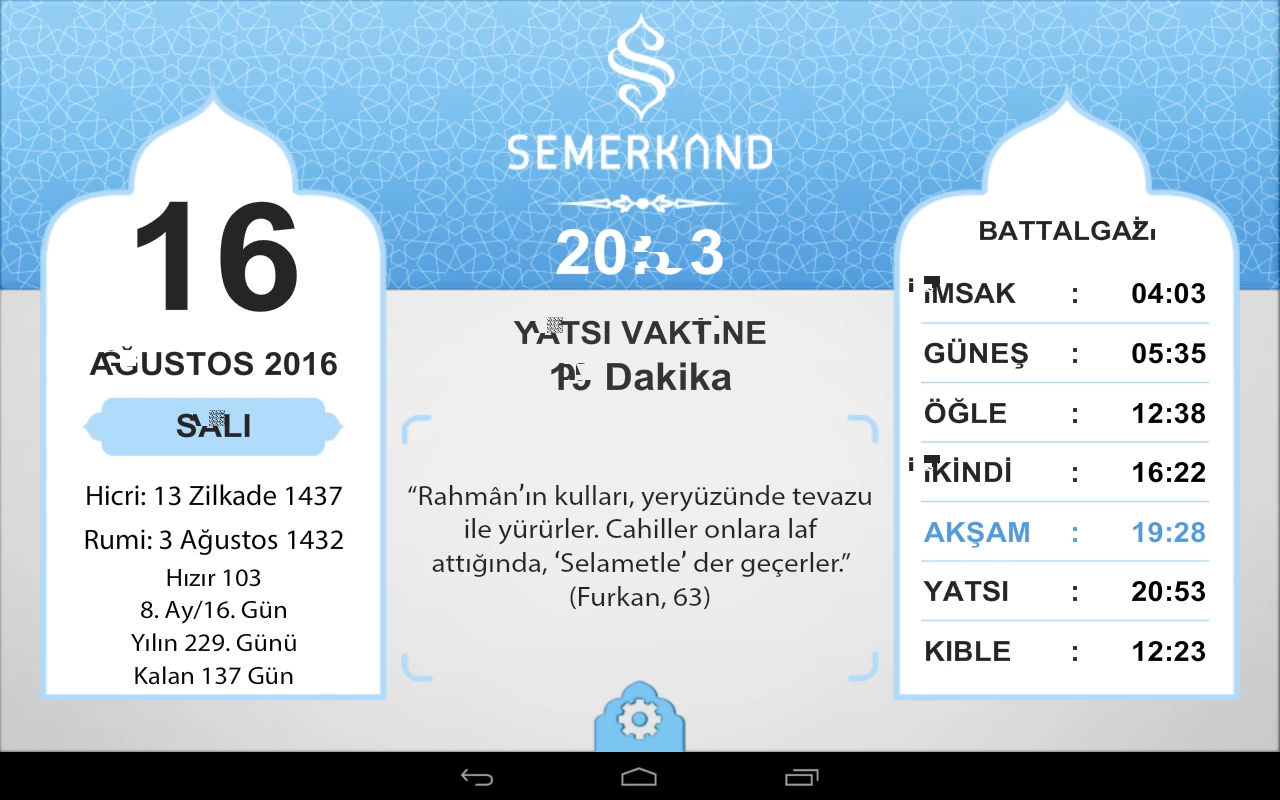
You can see the text deformation in air (22.0.0.153) app from the screenshot. Can you help me about this issue, thanks.

Device: Samsung Tablet n8005
This topic has been closed for replies.

1 reply

deesharm
Adobe Employee
Adobe Employee
August 18, 2016

Hi Seyfullah,

Could you please tell us the Android version that you are using with Samsung Tablet and also share the language that is being used in the application.

Thanks,

Adobe AIR Team

seyfx001Author
Inspiring
August 18, 2016

Android version: 4.3.1

App Language: Turkish

* Also i noticed that the issue is font specific (embedded Arial Bold). As you can see there is no problem with another font (embedded Myriad Pro Regular)

deesharm
Adobe Employee
Adobe Employee
August 19, 2016

Hi Seyfullah,

I tried with a sample Application having below code :

[Embed(source="arialbd.ttf",fontName = "myFont",mimeType = "application/x-font",advancedAntiAliasing="true",embedAsCFF="false")]

  var myEmbeddedFont:Class;

  var textField:TextField = new TextField();

  textField.defaultTextFormat = new TextFormat("myFont", 40);

  textField.embedFonts = true;

  textField.text = "Doğru git (gidin), sonra sola /sağa dön (dönün)";

  textField.autoSize = TextFieldAutoSize.LEFT;

  textField.type = TextFieldType.INPUT;

  this.addChild(textField);

I am running the application on Android devices having Android version 5.x and 6.0 using AIR 22.0.153 but I am not able to reproduce the bug.

It will be very helpful to us if you can share a sample project and please try running your application on other devices as well having different Android versions.

Is it a device specific issue ?

Thanks,

Adobe AIR Team
