
Text wrapping bug in TextField
We use textfield control extensively in our app. It has an issue with text wrapping that causes app to go in infinite layout cycle.
This problem occurs because text wrapping algorithm makes textfield height different in each rendering cycle.
This problem is not reproducible in IDE in debug mode. It occurs in installed .air app.
Steps to reproduce:
1) Make adobe air project and paste the code below in main mxml file.
2) Generate .air installer
3) install the app
4) Click in textfield
5) Move mouse outside textfield( but remain within app).
6) Note. Textfield textwrapping goes in to a cycle where it get confused and textfield height is differnt in each rendering cycle.
System configuration
Adobe AIR version 3.7.0.1530
Flash player: 11.5.502.110
Mac OS 10.7.5 (64-bit)
2.2 GHz Core i7
4GB RAM
Please click this .gif file to view the issue.
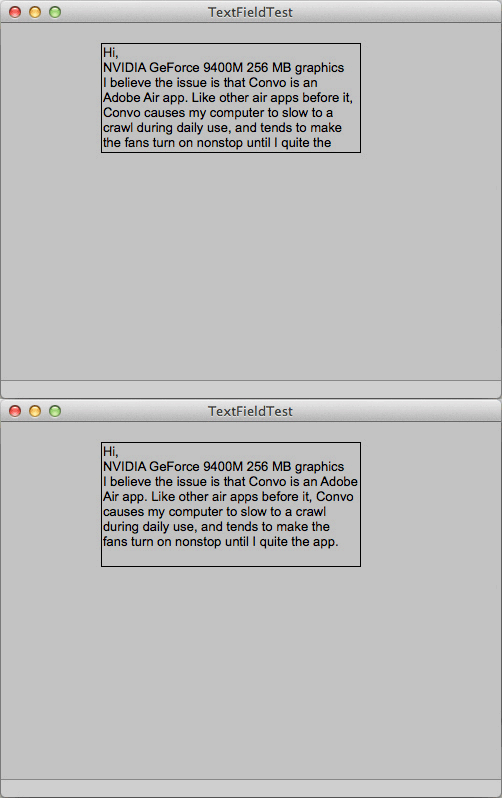
Sample Air App code
<?xml version="1.0" encoding="utf-8"?>
<mx:WindowedApplication xmlns:mx="http://www.adobe.com/2006/mxml" layout="absolute" creationComplete="windowedapplication1_creationCompleteHandler(event)">
<mx:Script>
<![CDATA[
import mx.core.UIComponent;
import mx.core.UITextField;
import mx.events.FlexEvent;
private var wrapper:UIComponent;
private var infoField:TextField;
protected function windowedapplication1_creationCompleteHandler(event:FlexEvent):void
{
wrapper = new UIComponent();
addChild(wrapper);
infoField= new TextField();
infoField.autoSize=TextFieldAutoSize.LEFT;
infoField.multiline=true;
infoField.wordWrap=true;
infoField.selectable = true;
infoField.border = true;
infoField.x = 100;
infoField.y = 20;
wrapper.addChild( infoField );
infoField.htmlText = '<textformat leading="0"><FONT FACE="Arial" COLOR="#0" SIZE="13"><P ALIGN="LEFT">Hi,</P><P ALIGN="LEFT">NVIDIA GeForce 9400M 256 MB graphics</P><P ALIGN="LEFT">I believe the issue is that Convo is an Adobe Air app. Like other air apps before it, Convo causes my computer to slow to a crawl during daily use, and tends to make the fans turn on nonstop until I quite the app.</P></FONT></textformat>';
infoField.width = 259;
}
]]>
</mx:Script>
</mx:WindowedApplication>


 AdChoices