
TextArea Clipping in Air 3.9 on iOS7
I hope someone can help here as this is driving me crazy
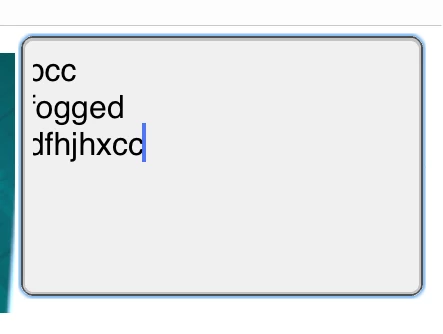
I am using the TextArea mobile component for Flex (yes, I know that it is Apache now, but someone on here hopefully can help!) and using it in the most vanilla way, but whatever I do I get clipped text at the start (see attached image)
<s:TextArea id="text" width="100%" height="260" />
I have tried standard system fonts, declaring the skins specifically such as
<s:TextArea id="text" width="100%" height="260" skinClass="spark.skins.mobile.StageTextAreaSkin" />
<s:TextArea id="text" width="100%" height="260" skinClass="spark.skins.mobile.TextAreaSkin" />
But it all has the same effect - the far left of the text is clipped. Now, I am sure it is something in the skin but I cannot track it down, and it does not happen in the TextInput skin, but TextArea is far more complex due to scrolling etc. I have actually also tried using the StageText object directly in ActionScript but it has the same issue, so I have started to think that it is perhaps something in Air. I am using the latest Air 3.9 beta and Flex 4.10 on iOS7, although it is on iOS 6 too.
Can anyone shed some light on this? It is driving me nuts!
Thanks


 AdChoices