Known Participant
November 22, 2016
Question

Turn on Anti-alising in AIR via/Animate

  • November 22, 2016
  • 1 reply
  • 451 views

As I was adding a HTML web view in Animate CC apparently, I hit a issue with Anti-aliasing text......
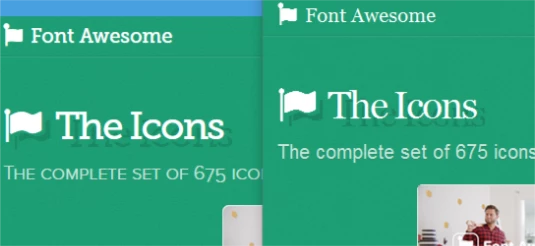
there's NO Anti-aliasing.

Is there a way to fix it?

This topic has been closed for replies.

1 reply

rogerc96594825
Known Participant
November 23, 2016

Do you mean StageWebView StageWebView - Adobe ActionScript® 3 (AS3 ) API Reference

What OS are you using ?

I know on iOS there are a lot of things that don't work with the UIWebView control which is the underpinning of this

Mikey186Author
Known Participant
November 23, 2016

I suppose....and I'm using Windows 10. I'm only using AIR for Desktop. Here's my code

import flash.display.Stage;
import flash.geom.Rectangle;
import flash.media.StageWebView;
import flash.events.Event;

var wView:int = stage.stageWidth;

var hView:int = stage.stageHeight;

var swv:StageWebView = new StageWebView();

swv.viewPort = new Rectangle(0,0,wView,hView);

swv.loadURL("[nameofurl");

swv.addEventListener(Event.COMPLETE,onCompleteHandler);

function onCompleteHandler(e:Event):void {

  swv.removeEventListener(Event.COMPLETE,onCompleteHandler);

  swv.stage = this.stage;

}

rogerc96594825
Known Participant
November 23, 2016

If you are using W10 then AIR will probably use Microsoft Edge as its browser component.

I don't use W10, nor special fonts, so I've not seen this issue.