
Participating Frequently
December 2, 2014
Question

Unable to publish AIR for IOS. CS6

  • December 2, 2014
  • 4 replies
  • 2145 views

Hi all,

Recently i have been unable to publish any apps for iOS on Flash CS6. Whenever i click on the "Edit Application settings" spanner icon in Properties or File->Publish settings. The publish window doesn't open when i'm targeting AIR for IOS. I've tried this with the 3 AIR packages i have installed on my Mac Pro (Yosemite).

After trying to open the publish settings, if i close or open a new file, Flash crashes so i think Flash is bugging out because it's still trying to open the window. I have opened a fresh file and i can't open the publish settings. Opening a new file and copying over my layers also didn't change a thing.

The strange thing is that if i change the target to Desktop or Android, the publish window opens!

I have just uninstalled Flash CS6 and installed it again, installed the latest updates and nothing has changed so i've came online to ask for help.

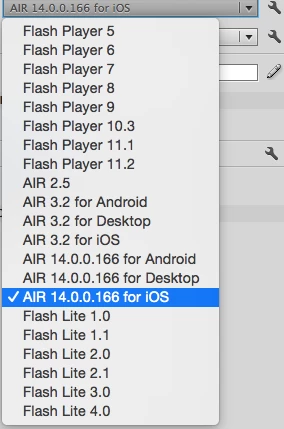
I've attached a screenshot of my target developments. Again, none of the IOS target open the publishing window but if i choose AIR for Android or AIR for Desktop, the window does open.
Kind regards

Daniel

Update: I"ve updated the AIR SDK to 15 but no change!

This topic has been closed for replies.

4 replies

caco_chapira
Participating Frequently
March 31, 2015

Guys Adobe are investigating about it, please vote in my bug report,
and maybe it get stronger enough to Adobe fix the bug!

https://bugbase.adobe.com/index.cfm?event=bug&id=3938642

Participant
March 5, 2015

Hi. I'm experiencing exactly the same problem. All issues came after the installation of OS Yosemite from Mavericks.

What OS do you have in your Macs?

Thanks

Jordi

Participating Frequently
March 6, 2015

Hi Jordia, The problem for me hasn't been fixed since i posted in December!

Like you, the issue came for me after upgrading to OS Yosemite. I'm now on version 10.10.2 and using AIR 17.0..0.115. Aaron above posted a work around, what i do is duplicate the folder i keep the certificates for that AIR project and delete the original certificate folder. When you go to publish, the IOS publishing window will appear. Save the password for the todays session which will allow you to make changes to the app and create the .ipa file to test on your iOS device for the remainder of the day. If you close down Flash though, you'll have to duplicate your certificate folder and repeat.....

Thanks

Daniel

Mohanaraj
Adobe Employee
Adobe Employee
March 9, 2015

Hi Daniel,

Just want to let you know that this is a Flash CS6 only issue and it has already been addressed in Flash Professional CC. However you can fix this issue in Flash CS6 by

1. Launch Flash CS6 and open the file for which the 'Edit application settings' button is not working

2. Just rename the folder that contains the Certificate and Provisioning profile used in the file

3. Now click on the 'Edit application settings' button

>> 'Edit application settings' button works and the AIR for iOS Settings dialog is up

4. Under Deployment tab choose a valid Certificate and Provisioning profile

5 Click OK and save the file

6 Quit Flash CS6 and relaunch the application

>> The issue will be fixed and the 'Edit application settings' button will continue to work


Can you please try out the above steps and see if that helps?

Thanks!

Mohan

Participating Frequently
December 29, 2014

HI

I faced the same issue too.

I found a quick walk around is to move your .p12 and Provisioning profile file to somewhere else and the dialogue box will appear!

However after you have set the two files and publish the ipa, the problem comes back again and you have to shift the files to somewhere else and repeat the whole process.

aaron

Participating Frequently
December 29, 2014

Hi Aaron,

I did noticed when I attempted to create a new directory and copied the code and objects from the original project - I could publish AIR for IOS. 'Publish Settings' becomes unavailable after publishing it once and Flash crashes soon after.

LIke you said, it's not the solution or conveinent but its a work around.

Thanks,

Daniel

Participant
December 16, 2014

Hi DanTheMan0809,

I am encountering exactly the same issue.

Could anybody help?

I do confirm that updating the AIR SDK does not change anything.

Many thanks,

Thibault