
Mr. Baker the Shoe Maker
Inspiring
January 24, 2016
Answered

Unexpected or unknown element or attribute in the application.... (application.iPhone is an unexpected/attribute - SOS!!!!!!!!! SOS!!!!!!!!!

  • January 24, 2016
  • 1 reply
  • 1430 views

I am attempting to package an ipa file and am getting the following error:
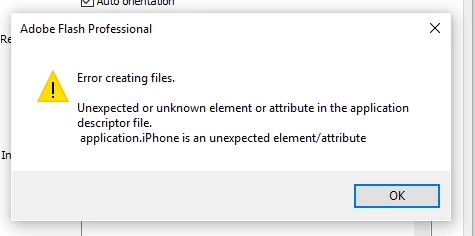
My development environment: Win10, Flash CC 2015, Air 19.0.0.241. I am also using the Push notifications ANE from Milkman games. I am using a production certificate and provisioning profile. Ultimately I want to test the app on iOS in TestFlight.

I had some suggests but this did not work. I tried different things, with new errors. (Daniel Albu - Albu Interactive Labs)

I also went through the Air Applications Descriptor Elements Documentation but I have figured anything out yet.

I need help!

Here is the code:

<?xml version="1.0" encoding="utf-8" standalone="no" ?>

<!--

    Usage:

    To localize the description, use the following format for the description element.

    <description>

    <text xml:lang="en">English App description goes here</text>

    <text xml:lang="fr">French App description goes here</text>

    <text xml:lang="ja">Japanese App description goes here</text>

    </description>

    To localize the name, use the following format for the name element.

    <name>

    <text xml:lang="en">English App name goes here</text>

    <text xml:lang="fr">French App name goes here</text>

    <text xml:lang="ja">Japanese App name goes here</text>

    </name>

-->

<application xmlns="http://ns.adobe.com/air/application/19.0">

  <id>com.myapp.app</id>

  <versionNumber>1.2.1</versionNumber>

  <filename>MyAppName</filename>

  <description/>


  <name>MyAppName</name>

  <initialWindow>

    <content>MyApp.swf</content>

    <systemChrome>standard</systemChrome>

    <transparent>false</transparent>

    <visible>true</visible>

    <fullScreen>true</fullScreen>

    <aspectRatio>landscape</aspectRatio>

    <renderMode>direct</renderMode>

    <autoOrients>true</autoOrients></initialWindow>

  <icon>

    <image29x29>Icons/ah_29.png</image29x29>

    <image57x57>Icons/ah_57.png</image57x57>

    <image114x114>Icons/ah_114.png</image114x114>

    <image512x512>Icons/ah_512.png</image512x512>

    <image48x48>Icons/ah_48.png</image48x48>

    <image72x72>Icons/ah_72.png</image72x72>

    <image50x50>Icons/ah_50.png</image50x50>

    <image58x58>Icons/ah_58.png</image58x58>

    <image100x100>Icons/ah_100.png</image100x100>

    <image144x144>Icons/ah_144.png</image144x144>

    <image1024x1024>Icons/ah_1024.png</image1024x1024>

    <image40x40>Icons/ah_40.png</image40x40>

    <image76x76>Icons/ah_76.png</image76x76>

    <image80x80>Icons/ah_80.png</image80x80>

    <image120x120>Icons/ah_120.png</image120x120>

    <image152x152>Icons/ah_152.png</image152x152>

  </icon>

  <customUpdateUI>false</customUpdateUI>

  <allowBrowserInvocation>false</allowBrowserInvocation>


  <supportedLanguages>en</supportedLanguages>


  <iPhone>

    <Entitlements>

<![CDATA[

<key>application-identifier</key>

<string>000000000.com.myapp.app</string>

<key>aps-environment</key>

<string>production</string>

<key>beta-reports-active</key>

<true/>

<key>keychain-access-groups</key>

<array>

<string>000000000.com.myapp.app</string>

</array>

]]>

</Entitlements>

    <requestedDisplayResolution>standard</requestedDisplayResolution>

</iPhone>


  <iPhone>

    <InfoAdditions><![CDATA[

  <key>UIDeviceFamily</key>

  <array>

    <string>1</string>

    <string>2</string>

  </array>

]]></InfoAdditions>

  </iPhone>


  <extensions>

    <extensionID>com.milkmangames.extensions.EasyPush</extensionID>

  </extensions>

</application>

This topic has been closed for replies.
Correct answer Colin Holgate

You have two sets of 'iPhone' in there. Move the infoadditions from the second iPhone tags into the first iPhone tags.

1 reply

Colin Holgate
Colin HolgateCorrect answer
Inspiring
January 24, 2016

You have two sets of 'iPhone' in there. Move the infoadditions from the second iPhone tags into the first iPhone tags.

Mr. Baker the Shoe Maker
Inspiring
January 24, 2016

I move the infoadditions to the first iphone tag but I still get the exact same message.

Here is what I did:

<?xml version="1.0" encoding="utf-8" standalone="no" ?>

<!--

    Usage:

    To localize the description, use the following format for the description element.

    <description>

    <text xml:lang="en">English App description goes here</text>

    <text xml:lang="fr">French App description goes here</text>

    <text xml:lang="ja">Japanese App description goes here</text>

    </description>

     To localize the name, use the following format for the name element.

    <name>

    <text xml:lang="en">English App name goes here</text>

    <text xml:lang="fr">French App name goes here</text>

    <text xml:lang="ja">Japanese App name goes here</text>

    </name>

-->

<application xmlns="http://ns.adobe.com/air/application/19.0">

  <id>com.myapp.app</id>

  <versionNumber>1.2.1</versionNumber>

  <filename>MyAppName</filename>

  <description/>


  <name>MyAppName</name>

  <initialWindow>

    <content>MyApp.swf</content>

    <systemChrome>standard</systemChrome>

    <transparent>false</transparent>

    <visible>true</visible>

    <fullScreen>true</fullScreen>

    <aspectRatio>landscape</aspectRatio>

    <renderMode>direct</renderMode>

    <autoOrients>true</autoOrients></initialWindow>

  <icon>

    <image29x29>Icons/ah_29.png</image29x29>

    <image57x57>Icons/ah_57.png</image57x57>

    <image114x114>Icons/ah_114.png</image114x114>

    <image512x512>Icons/ah_512.png</image512x512>

    <image48x48>Icons/ah_48.png</image48x48>

    <image72x72>Icons/ah_72.png</image72x72>

    <image50x50>Icons/ah_50.png</image50x50>

    <image58x58>Icons/ah_58.png</image58x58>

    <image100x100>Icons/ah_100.png</image100x100>

    <image144x144>Icons/ah_144.png</image144x144>

    <image1024x1024>Icons/ah_1024.png</image1024x1024>

    <image40x40>Icons/ah_40.png</image40x40>

    <image76x76>Icons/ah_76.png</image76x76>

    <image80x80>Icons/ah_80.png</image80x80>

    <image120x120>Icons/ah_120.png</image120x120>

    <image152x152>Icons/ah_152.png</image152x152>

  </icon>

  <customUpdateUI>false</customUpdateUI>

  <allowBrowserInvocation>false</allowBrowserInvocation>

  <supportedLanguages>en</supportedLanguages>

<iPhone>

    <InfoAdditions><![CDATA[

        <key>UIDeviceFamily</key>

        <array>

          <string>1</string>

          <string>2</string>


        </array>]]>

  </InfoAdditions>

    <Entitlements>

        <![CDATA[

        <key>application-identifier</key>

        <string>000000000.com.myapp.app</string>

        <key>aps-environment</key>

        <string>production</string>

        <key>beta-reports-active</key>

         <true/>

        <key>keychain-access-groups</key>

        <array>

        <string>000000000.com.myapp.app</string>

        </array>


        ]]>

    </Entitlements>

    <requestedDisplayResolution>standard</requestedDisplayResolution>

</iPhone>

<extensions>

    <extensionID>com.milkmangames.extensions.EasyPush</extensionID>

  </extensions>

</application>

lagoon_bbo
Known Participant
January 26, 2016

that's not the same message, you have something wrong inside Entitlements, you can try comment all your Entitlements content and remove comments value by value to see what is causing problem.