
pwillener
Legend
April 15, 2015
Answered

Update AIR from 17.0.0.124 to 144 fails on Windows XP

  • April 15, 2015
  • 2 replies
  • 1365 views

Never, ever had any problem updating Adobe AIR.  Today for the first time I get this when trying to run the update
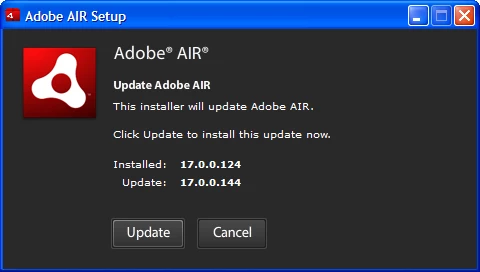
then after clicking Update
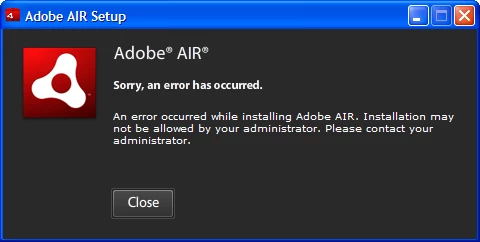
Is there an install log file somewhere that could help determine what the problem is?

This topic has been closed for replies.
Correct answer

I have the identical problem and am running Windows XP Pro SP3

I tried to update from 17.0.0.124 to 17.0.0.144

Standard update (double click installer) - the update failed (as described by OP)

When msiexec was not running - the update failed

When msiexec.exe was running - and then killed - the update failed

I uninstalled 17.0.0.124 via Control Panel - and then installed 17.0.0.144

- the installer worked as expected this time

I restarted the PC - and everything was back to normal!

Good luck

2 replies

Correct answer
April 17, 2015

I have the identical problem and am running Windows XP Pro SP3

I tried to update from 17.0.0.124 to 17.0.0.144

Standard update (double click installer) - the update failed (as described by OP)

When msiexec was not running - the update failed

When msiexec.exe was running - and then killed - the update failed

I uninstalled 17.0.0.124 via Control Panel - and then installed 17.0.0.144

- the installer worked as expected this time

I restarted the PC - and everything was back to normal!

Good luck

Varun_Bhal
Adobe Employee
Adobe Employee
April 16, 2015

Hi,

I have tried updating Adobe AIR from 17.0.0.124 to 17.0.0.144 on Windows XP SP3 and its working fine for me.

Seems to be a permission issue for you or may be any conflicting process running in the task manager.

Please try to kill all the "Adobe AIR installer" and "msiexec.exe" process from task manager and try again.

If still its failing, Installation logs can be found at : C:\Documents and Settings\username\Local Settings\Application Data\Adobe\AIR\logs

Note : You have to enable hidden files and folders to view Local settings folder under your username directory.

-Varun

pwillener
pwillenerAuthor
Legend
April 17, 2015

Thank you for the information.  Checked that there is no "AdobeAIRInstaller.exe" or "msiexec.exe" process running, then ran the update again, with the same result.

This is the content of the log file

[2015-04-17:13:04:02] Runtime Installer begin with version 17.0.0.144 on Windows XP x86

[2015-04-17:13:04:02] Commandline is:

[2015-04-17:13:04:02] Installed runtime (17.0.0.124) located at c:\Program Files\Common Files\Adobe AIR

[2015-04-17:13:04:05] Starting runtime update. Updating runtime from version 17.0.0.124 to version 17.0.0.144

[2015-04-17:13:04:06] Reinstalling c:\docume~1\goodda~1.gd-\locals~1\temp\air86.tmp\setup.msi

[2015-04-17:13:04:10] Error occurred during msi repair operation; beginning rollback: [ErrorEvent type="error" bubbles=false cancelable=false eventPhase=2 text="1603" errorID=0]

[2015-04-17:13:04:10] Rollback complete

[2015-04-17:13:04:10] Exiting due to error: [ErrorEvent type="error" bubbles=false cancelable=false eventPhase=2 text="1603" errorID=0]

[2015-04-17:13:04:12] Runtime Installer end with exit code 7

I could try to uninstall AIR, then reinstall, but I'm afraid if I get another error while installing, I won't be able to run my AIR apps any more.

Varun_Bhal
Adobe Employee
Adobe Employee
April 17, 2015

Hi,

Sorry but am not able to reproduce this problem at my end but as per logs also it seems to be a msi issue.

Since its not reproducing for me so can you please follow the below steps and check it again ?

1. On the Start menu (Windows), click Run

2. Enter msiexec /unregister, and then click OK.

3. On the Start menu (Windows), click Run

4. Enter msiexec /regserver, and then click OK.

5. Clear your temp directory.

6. Try to update again.

It will re-register your msi service and it can resolve many msi related. Hope it solves your problem.

-Varun