Inspiring
December 3, 2014
Answered

Weird message from ADT (AIR SDK 16.0.0.214)

  • December 3, 2014
  • 2 replies
  • 1467 views

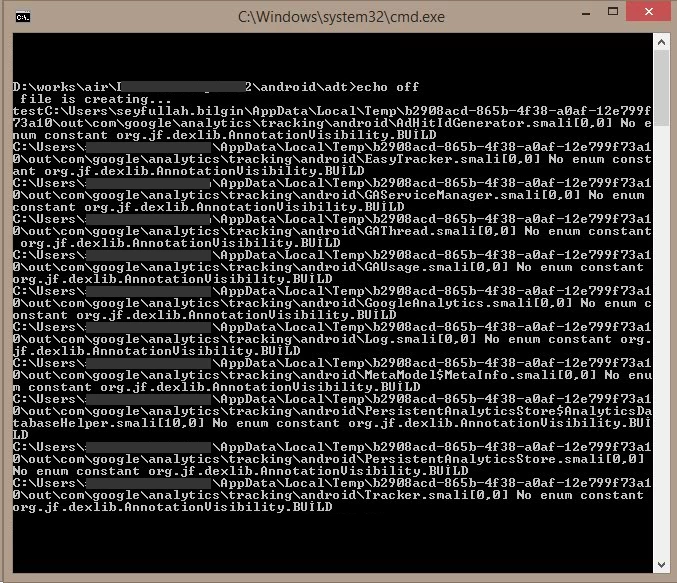
i am trying to build my android app with this ANE (alebianco/ANE-Google-Analytics) but i have been getting following weird message and packaging APK has been aborted

i get this message  when am trying to build another ANE file (google analytics service of android sdk) too.

i don't understand what's happening...

sorry bad english.


This topic has been closed for replies.
Correct answer seyfx001

Hi,

We could not reproduce the issue Using the following environment:

Win 8.1 64 bit OS (Alos tried on win7, 64bit and Win 8, 64bit)

AIR: 16.0.0.214

Java: 1.8.0_11

Please find the screenshot to confirm the same.
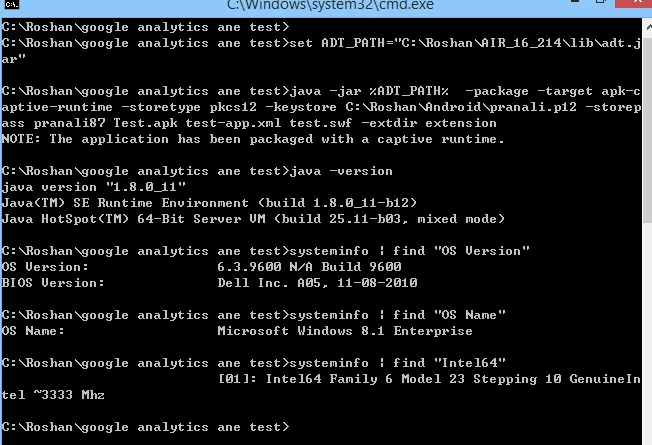
Kindly let us know if we are missing anything in the above test. We will like to go to the bottom of it if reproduced.

-Roshan

Adobe Air


i sent a mail about this problem to Milkman Games Support and  recieved a mail for solution from Alex:


You need to reset the language to english, than restart the IDE- the problem is the special characters are being added by your system language but can't be parsed:

the AIR SDK uses the Java JDK to look for classes using English characters; your system language is adding special characters (see it says RUNTȈME instead of RUNTIME).

You need to change either the JDK or System language on your system to English and rebuild.

i changed the system language from Turkish to English and problem solved.

Thanks to everyone

2 replies

Adobe Employee
December 4, 2014

We are looking into this.

Kindly share application resources, xml and ane files using which you are able to reproduce this.

-Roshan

Adobe Air.

seyfx001Author
Inspiring
December 4, 2014

thank you for your interest...

that's link of resource files to reproduce the error..

google analytics ane test.rar - Google Drive

test configurations:

Adobe AIR SDKs: 16.0.0.214 - 15.0.0.249 - 14.0.0.125

Google Analytics ANE

windows 8.1 64 bit

Adobe Employee
December 4, 2014

Hi,

I used the resources sent to me by you and it worked fine for AIR 16.0.0.214. I tried in Win7 64 bit machine.

Soon I will be testing the same in Win8.1 64 bit and share the results.

Mean time kindly let me know the Java version you have installed in your system.

command is:

java -version.

-Roshan

Adobe Air

seyfx001Author
Inspiring
December 4, 2014

Is there anyone? please help.


And i have been getting smillar weird message by using Milkman Google Analytics ANE too.


i compiled the apk file successfully when am delete red line from app manifest code which is the below.


this is the android manifest file:


<?xml version="1.0" encoding="UTF-8" standalone="no" ?>

<application xmlns="http://ns.adobe.com/air/application/16.0">

  <id>com.xxx</id>

  <versionNumber>2.0</versionNumber>

  <versionLabel/>

  <filename>xxx</filename>

  <description/>

  <name>xxx</name>

  <copyright/>

  <initialWindow>

   <content>xxx.swf</content>

   <systemChrome>standard</systemChrome>

   <transparent>false</transparent>

   <visible>true</visible>

   <fullScreen>true</fullScreen>

   <aspectRatio>portrait</aspectRatio>

   <renderMode>gpu</renderMode>

   <autoOrients>false</autoOrients>

  </initialWindow>

  <icon>

    <image36x36>icons/logo36.png</image36x36>

    <image48x48>icons/logo48.png</image48x48>

    <image72x72>icons/logo72.png</image72x72>

  <image96x96>icons/logo96.png</image96x96>

  <image144x144>icons/logo144.png</image144x144>

  </icon>

  <customUpdateUI>false</customUpdateUI>

  <allowBrowserInvocation>false</allowBrowserInvocation>

   <extensions>

   <extensionID>com.milkmangames.extensions.GAnalytics</extensionID>

   <extensionID>com.adobe.air.sampleextensions.android.licensing</extensionID>

  </extensions>

  <android>

   <manifestAdditions>

     <![CDATA[<manifest android:installLocation="preferExternal">

<uses-permission android:name="android.permission.INTERNET"/>

<uses-permission android:name="android.permission.WAKE_LOCK"/>

<uses-permission android:name="android.permission.DISABLE_KEYGUARD"/>

<uses-permission android:name="android.permission.ACCESS_NETWORK_STATE" />

<uses-permission android:name="android.permission.WRITE_EXTERNAL_STORAGE"/>

<uses-permission android:name="com.android.vending.CHECK_LICENSE"/>

<application>

  <service android:name="com.google.analytics.tracking.android.CampaignTrackingService" />

  <receiver android:name="com.google.analytics.tracking.android.CampaignTrackingReceiver" android:exported="true">

   <intent-filter>

  <action android:name="com.android.vending.INSTALL_REFERRER" />

   </intent-filter>

  </receiver>

  </application>

</manifest>]]>

    </manifestAdditions>

  </android>

  <supportedLanguages>tr en</supportedLanguages>

</application>

Colin Holgate
Inspiring
December 4, 2014

I don't know what's causing the error, but you ought to use AIR 16.0.0.222. Things get fixed every time a new beta comes out, so it's worth trying.

seyfx001Author
Inspiring
December 4, 2014

for my understanding this error relevant android ANE which use Google Analytics Android API on my computer.

there is no problem with other ANE files

Can anyone test with this ANE?

http://www.devactionscript.com/free-ane/google-analytics-ane-adobe-air-native-extensions-for-android/

a screenshot from flash professional CS6...