
November 28, 2015
Answered

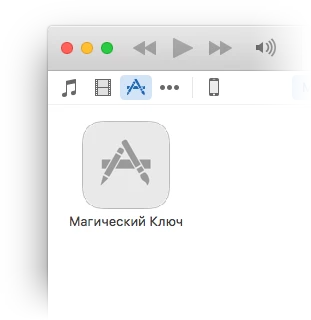
Why don't I see app icon on the iTunes?

  • November 28, 2015
  • 1 reply
  • 445 views

I'm developing an Adobe AIR game. In the application descriptor file I added all iOS icons:

<icon>

        <image29x29>icons/ios/Icon-Small.png</image29x29>

        <image40x40>icons/ios/Icon-Small-40.png</image40x40>

        <image50x50>icons/ios/Icon-Small-50.png</image50x50>

        ...

        <image152x152>icons/ios/Icon-76@2x.png</image152x152>

        <image180x180>icons/ios/Icon-60@3x.png</image180x180>

        <image1024x1024>icons/ios/iTunesArtwork@2x.png</image1024x1024>

</icon>

When I built IPA file and drag&drop it to the iTunes app on my Mac I don't see the app icon. Why?

I open the IPA file as zip archive. It contains only Payload folder with my game (MagicKey.app). I know that there is must be iTunesArtwork file.

What should I do to fix my issue?
This topic has been closed for replies.
Correct answer Colin Holgate

That's normal. The iTunes image will appear ok when the app is downloaded from the App Store.

I find using the standard icon names to be too stressful, I can never remember what size Icon-Small is. Instead I name the icons after their size, and ADT takes care of giving them the right names in the IPA. I can see from your brief list that you may be missing some sizes. Here's my current list, which doesn't yet include iPad Pro, because ADT doesn't handle that yet:

29.png

36.png

40.png

48.png

50.png

57.png

58.png

72.png

76.png

80.png

96.png

100.png

114.png

120.png

144.png

152.png

512.png

1024.png

BTW, I use Photoshop's Generator feature to create all the icons.

1 reply

Colin Holgate
Colin HolgateCorrect answer
Inspiring
November 28, 2015

That's normal. The iTunes image will appear ok when the app is downloaded from the App Store.

I find using the standard icon names to be too stressful, I can never remember what size Icon-Small is. Instead I name the icons after their size, and ADT takes care of giving them the right names in the IPA. I can see from your brief list that you may be missing some sizes. Here's my current list, which doesn't yet include iPad Pro, because ADT doesn't handle that yet:

29.png

36.png

40.png

48.png

50.png

57.png

58.png

72.png

76.png

80.png

96.png

100.png

114.png

120.png

144.png

152.png

512.png

1024.png

BTW, I use Photoshop's Generator feature to create all the icons.