Inspiring
April 19, 2018
Answered

"Your binary is not optimized for iPhone 5" Strikes Again.

  • April 19, 2018
  • 1 reply
  • 3591 views

I'm getting this error from Apple Application Loader:

ERROR: ERROR ITMS-90096: "Your binary is not optimized for iPhone 5 - New iPhone apps and app updates submitted must support the 4-inch display on iPhone 5 and must include a launch image referenced in the Info.plist under UILaunchImages with a UILaunchImageSize value set to {320, 568}. Launch images must be PNG files and located at the top-level of your bundle, or provided within each .lproj folder if you localize your launch images. Learn more about iPhone 5 support and app launch images by reviewing the 'iOS Human Interface Guidelines' at https://developer.apple.com/ios/human-interface-guidelines/graphics/launch-screen."

The app was built with AIR 29. Here are the launch images included in Animate:
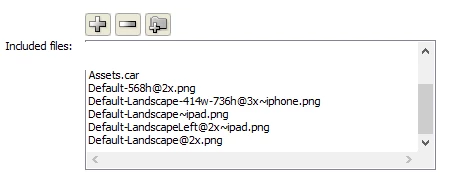
Never had this particular error before, although it does seem that submitting to Apple App Store takes more time than the actual development How can this be fixed? Thank you.

This topic has been closed for replies.
Correct answer Flipline

Pravishtis,

As you requested over email, I have looked again at the Launch Images on iOS with Adobe AIR  page. It turns out I was missing a couple of images (was the page modified lately?). Created new images and tried to submit the app again, but got the same error.

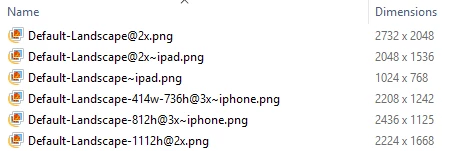
Here is a screenshot from Windows. I think that's in compliance with the Launch Images on iOS with Adobe AIR page, but could you please double-check that?

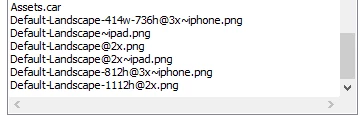
This is from Animate export:


It looks like you're missing the Default-568h@2x~iphone.png image from this list, you'll need that even though it's a landscape app, since most of the phone launch images are Portrait-only like Colin mentioned.

I'd recommend adding these, and make sure you make them in portrait (not landscape) following Colin's instructions for rotation above:

Default-568h@2x~iphone.png (640 x 1136)

Default-414w-736h@3x~iphone.png (1242 x 2208)

Default-375w-667h@2x~iphone.png (750 x 1334)

Default@2x~iphone.png (640 x 960)

1 reply

Colin Holgate
Inspiring
April 19, 2018

I don't know if Assets.car changes things, I haven't had to do one of those yet. If it does include splash screens you would want to make sure Default-568h@2x.png is in there too.

That aside, I have seen cases where I had to add ~iphone to splash screen file names. Try duplicating the Default-568h@2x.png and name the duplicate as Default-568h@2x~iphone.png.

Inspiring
April 19, 2018

Thank you Colin for the quick reply. It seems that Assets.car only needs the icons. I used this tool to create it: www.applicationloader.net/appuploader/icontool.php

I renamed Default-568h@2x.png. Got the same error.

Colin Holgate
Inspiring
April 19, 2018

In cases where I used ~iphone, I kept the normal one too.