Known Participant
January 24, 2013
Answered

1119 error

  • January 24, 2013
  • 2 replies
  • 1950 views

hi everyone!

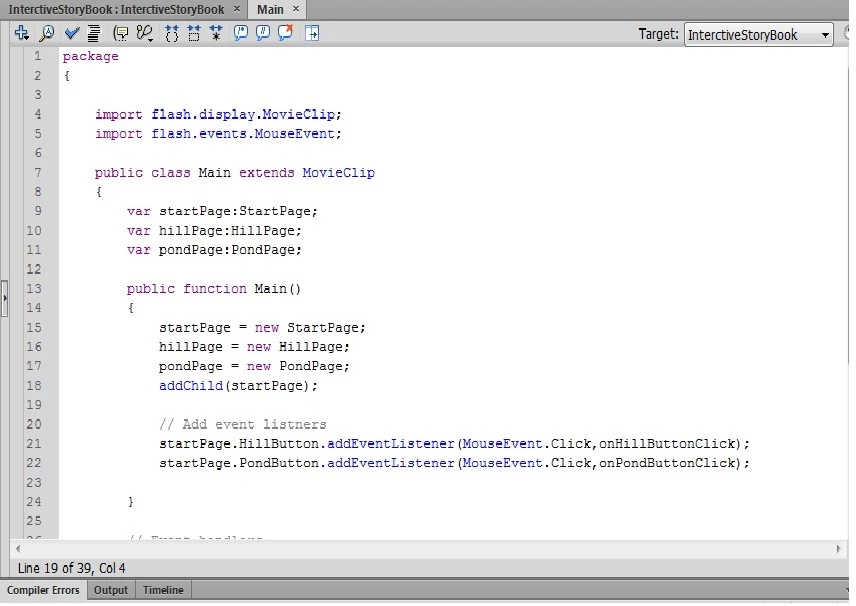
I'm starting to learn how to work with flash, and i can't seem to get over this damn error...

Can somebody please look at my code and tell me what I'm doing wrong?

I'm getting the error for lines 21 and 22.

Thanks a lot!
This topic has been closed for replies.
Correct answer Ned Murphy

Any ideas?


Yep... "CLICK", not "Click"

You didn't recognize it but the error message probably changed since fixing the spelling.... but I think now you'll find you are still not getting what you expect due to other typos/copy-paste errors.

In the future, if you get errors be sure to provide the entire error messages in your posting

2 replies

Ned Murphy
Legend
January 24, 2013

The error is likely indicating that as far as the compiler sees it, the two objects you are trying to target in those lines do not exist.  Make sure they exist in a current frame when that code executes and check instance names.

Sason922Author
Known Participant
January 24, 2013

Thank you both for you answers, unfortunately the problem remains...

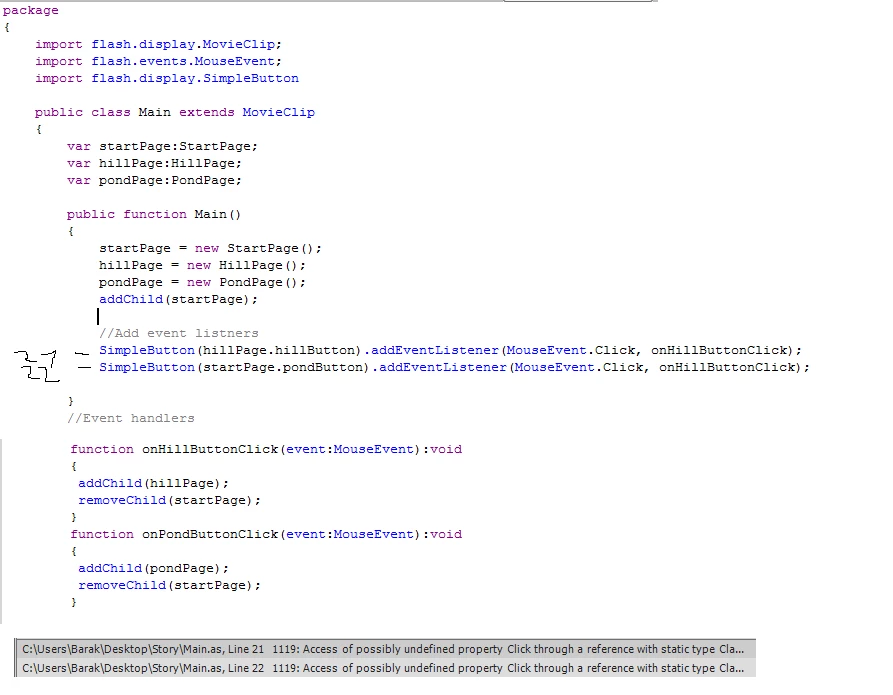
I changed the code as kglas suggested:

but that didn't help...so i guss the problem is intance names
I'm not sure i fully comprehend the concept, maybe through the screenshots you can tell me whats wrong:

thats the .fla file (the startPage):

and that the relevant part of the library:

Can you spot the probelm?

Thanks guys!

Ned Murphy
Legend
January 24, 2013

Instance names are the names you assign to the objects in the Properties panel, not the names you see in the library.  THe code uses those names to target the objects.

Did you manually place the hill and pond button objects inside the startPage object?  If so, you need to assign them instance names (same with the startPage).

If you are assigning those as class names for the objects then you should not use them as instance names... normally, class names start with capital letters and instance names don't, so I'd recommend changing the instance names to "hillButton" and "pondButton"

If you did not manually place those buttons inside the startPage object I have a different explanation to provide.

kglad
Community Expert
Community Expert
January 24, 2013

cast those obects explicitly.  for example, if they are SimpleButton's import that class and use:

SimpleButton(startPage.HillButton).addEventListener(etc...)

also, you should use the parantheses when you're creating new objects:

startPage=new StartPage();

etc