
Known Participant
March 27, 2019
Answered

360◦ or 720◦ Rotation now impossible?!?

  • March 27, 2019
  • 2 replies
  • 2902 views

After being a Flash user for many years I now find, in Animate, the simplest things so complicated. For example this morning I have spent two hours trying to create a spinning newspaper.

It used to be a mixture of rotate, scale and keypoints in the tween, a touch of F5 to adjust the timing and... was easy.

Now after it hits about 180◦ it just starts bouncing around.

I have tried and tried and tried and looked things up on the web. The so-called motion editor is no help.

If I had hair I'd be pulling it out.

Why does Adobe have to fix Flash things that weren't broken???

Does anyone have a clue/advice about rotating a symbol 720 degrees while (scaling down)?
This topic has been closed for replies.
Correct answer n. tilcheff

I'm the last person to defend Animate (since it feels like in a state of perpetual beta), but pointing the direction in which you want the rotation to go has always been a part of Properties for at least 15 years.

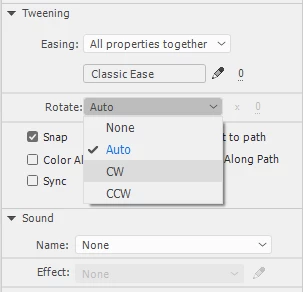
Choose CW, type in 2 and you will get two full clock-wise rotations, i.e. +720°

So, you only need two keys, do your scaling, add a classic tween and in the tween properties choose CW or CCW and type in how many full rotations want.

You can also add easing and if you want, use the custom ease to separate the rotation from the rest to give the sense of perspective - easing out as it goes away, without slowing down the rotations. It's as simple as that.

Good luck!

2 replies

evocrimAuthor
Known Participant
March 29, 2019

The simplicity of your answer now makes me look like a ranting idiot.

I just hadn't figured that the Tween itself would have the rotate properties rather than the object.

Thank you.

Legend
March 29, 2019

This ◦ isn't a degree symbol, by the way. It's Unicode "White Bullet".

This is a degree symbol: 360°

evocrimAuthor
Known Participant
April 2, 2019

I see it as a bonus that not only was my question answered perfectly but I also received a free critique of my ASCII/Unicode special character selection skills

n. tilcheff
n. tilcheffCorrect answer
Legend
March 27, 2019

I'm the last person to defend Animate (since it feels like in a state of perpetual beta), but pointing the direction in which you want the rotation to go has always been a part of Properties for at least 15 years.

Choose CW, type in 2 and you will get two full clock-wise rotations, i.e. +720°

So, you only need two keys, do your scaling, add a classic tween and in the tween properties choose CW or CCW and type in how many full rotations want.

You can also add easing and if you want, use the custom ease to separate the rotation from the rest to give the sense of perspective - easing out as it goes away, without slowing down the rotations. It's as simple as that.

Good luck!

Nick - Character Designer and Animator, Flash user since 1998 | Member of the Flanimate Power Tools team - extensions for character animation
Participant
July 3, 2022

Is there any way to do non-whole number # of rotations? In my animation I only want 3/4 of a turn!

n. tilcheff
Legend
July 3, 2022

Type '0' in the input field.

Nick - Character Designer and Animator, Flash user since 1998 | Member of the Flanimate Power Tools team - extensions for character animation