


3D X-axis rotation issues
Hey everyone.
First time poster here, looking for some advice into my recent issue using the 3D rotation tool.
So, without getting too deep in the weeds, I'm working on a animation around 5 mins in length, about midway in the animation, I want to use the 3D rotation tool to have an object give a better depth of movement. The goal was to have X-axis move back n forth to give the appearance of the object tipping back in forth directly towards the viewer.
When I applied the 3D rotation tool to the animation, instead of rotating properly in X-axis direction, it gave an odd right skew angle movement, it was trying to move the object in the X-axis but also skewing the image drastically. My guess was that the 3D tool has difficulty figuring out the stage, thus giving a incorrect movement in 3D space.
Here's what the 3D rotation should look correctly when applied to a square using the x-axis:
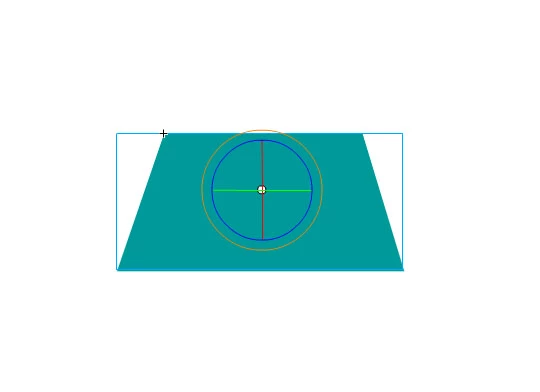
When working in a new space with not much applied to the scene, like the square for example, it works fine. But in any animation I have made that's more complex, the 3D rotation tool starts acting like this below:
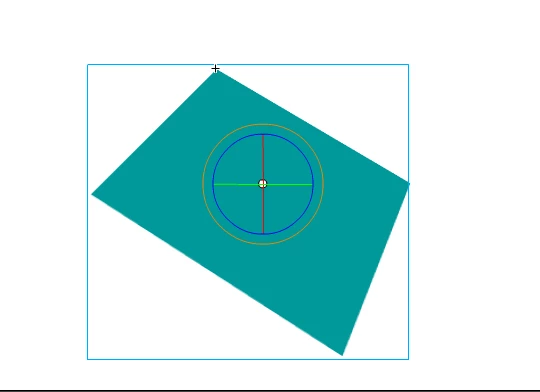
Above is my artistic attempt to show how the 3D rotation tool appears to be acting when directly using the X-axis.
Any thoughts to whats causing this issue? For the 3D rotation tool to be skew the image so badly?
Using latest Adobe Animate CC, Motion Tweens, ActionScript 3.0 Canvas. 1280 by 720 stage dimensions.
Thank you for the time and help!
 AdChoices