
Participant
November 4, 2021
Question

"A Javascript Error Occurred" with no additional explanation

  • November 4, 2021
  • 3 replies
  • 4811 views

Hi!

I'm working on a project for school that involves some simple animation and basic scripting on a HTML 5 canvas. My issue is that when I go to test the animation, I get a "A javascript error occured" message, and I'm at a loss as to what could be causing it.


I have some scripting in actions, but even if I completley delete this scripting, I still get the error message when testing the movie. I saw that there was another post with the same error message a few years back, and their fix was to restart animate, restart the computer and try unchecking "export image assets" under publish settings.
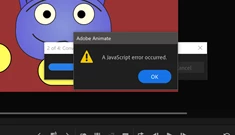
I'm at a loss! 

3 replies

Participant
May 3, 2025

I encountered this same error. I saved a duplicate file to test with to figure it out. This was my process:
Delete a layer ---> Publish ---> Repeat

I did this until I did not encounter the error to narrow down the layer causing the problem. Turns out in my situation, there was an issue with a blur filter I created.

GL!!

kglad
Community Expert
Community Expert
May 7, 2025

the most efficient way to find the culprit layer is to use binary search. eg, delete the top half of layers.  if the problem layer is in that half, delete the top half of that half etc.


that way if you have 2**n layers, it will require, at most, n steps to find the corrupt layer.  

Participant
April 29, 2024

Same error here....i've uninstalled and reinstalled animate...make all updates and upgrade..  no solutions found..  unfortunately...no support from adobe...  so I need to remake my symbols... 😞


kglad
Community Expert
Community Expert
April 29, 2024

upload your fla somewhere and post a link

Participant
May 27, 2024

Hello we're encountering this error too.
It's only happening on my colleagues machine with the same files that work on mine.
When she tries to publish or test a HTML/JS output it throws 'A Javascript error occurred.' and hangs.
The process is stuck on '2 of 4: Convert to JSX'
We've been using this set up for years and its the first time we've encountered this.
Was there any update?


Joseph Labrecque
Community Expert
Community Expert
November 4, 2021

If you attempt this on a different computer - do you recieve the same error message? It may be this particular installation has issues.

Participant
November 4, 2021

Yes, I've got another machine with Animate 2022 installed and I get the exact same message unfortunately.

Joseph Labrecque
Community Expert
Community Expert
November 4, 2021

It likely has more to do with the file itself then... one thing to try: File > Convert To... > ActionsScript 3.0 - once that file is created, convert it back to HTML5 Canvas to see whether he conversion fixes any file-based problem. The original file will be preserved.