


"Access of undefined property btn_website"
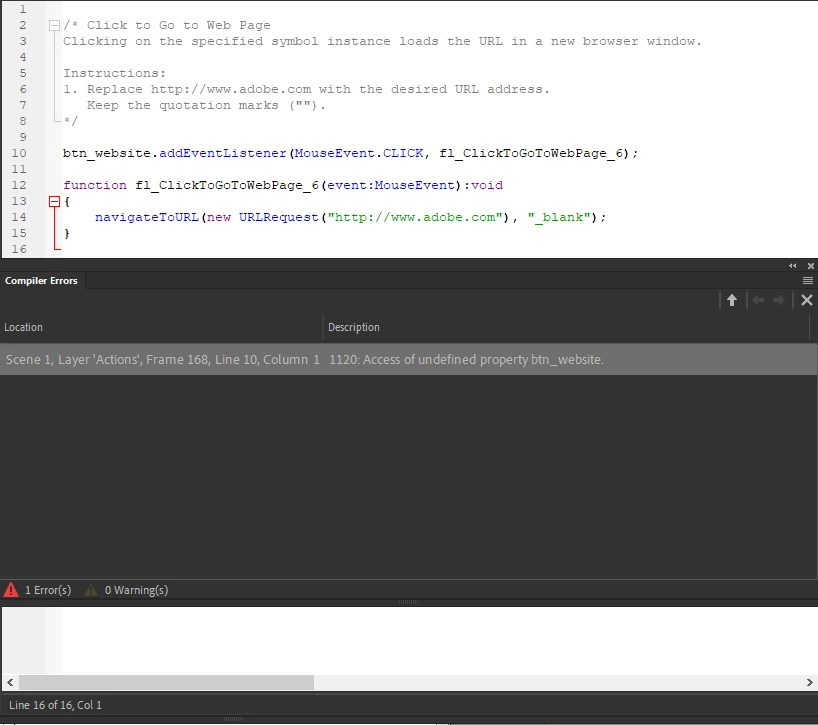
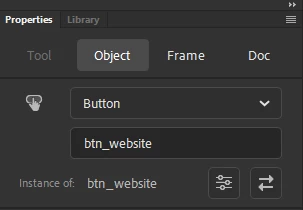
This is probably the angriest I've been in a while. I practically copied a video that did exactly this and it doesn't work. This is ALL of the code that Animate auto-generated, and this is the error it always throws. The instance names aren't wrong. The button name and the button instance are both the same, so there is no possible way it could try to access something that doesn't exist. Please tell me how I could have possibly gotten this wrong when there is literally nothing I could have done wrong. This is the only button in the entire project; this is as simple as it gets. I'm just using the "Click To Go To Webpage" snippet. Why is this happening? This nonsense happens with every single Adobe product and I honestly cannot believe people keep using their programs.
 AdChoices