Participating Frequently
November 15, 2012
Question

Action Script 3 help

  • November 15, 2012
  • 2 replies
  • 528 views

Hello everyone. I am trying to create an interactive quiz and I need some help. So on the screen there's four questions,one right answer and three wrong answers. When you get a question wrong it will show you what your answer was and what the right answer actually is.(look at picture below for example of what I mean). So my question is, how do I code it so whenever you actually pick the wrong answer, the wrong answer arrow will appear on the question the you have chosen?
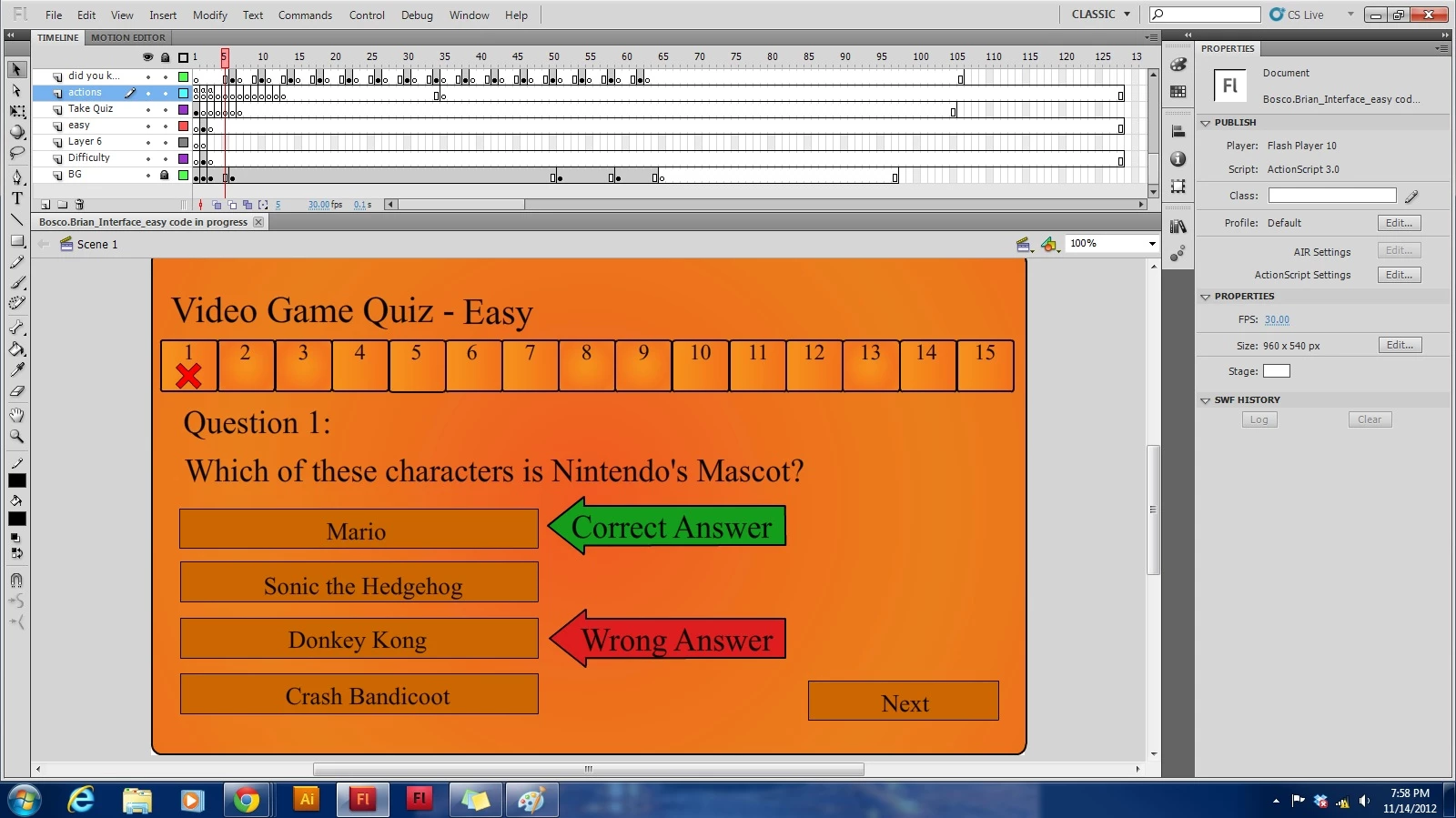
This topic has been closed for replies.

2 replies

Ned Murphy
Legend
November 15, 2012

What controls do you currently have in place for the wrong answer object?  What you will need to do is to set its y property to be the same (relatively) as the answer that was selected and then make it visible.

sinious
Legend
November 15, 2012

These questions aren't really suitable for these forums. They're "will you please do my project for me" questions. The forums should be used to answer questions that you stumble on rather than these broad stroke questions.

Regardless, the simple strategy you're going to want to target because of your frame-to-frame question setup is code in each frame that's customized to the frame (by the looks of the timeline).

As a coder you should be trying to make things simple on yourself. Every question frame you encounter you really don't want to re-write the same code over and over. If you update anything, all that duplicated code needs to be updated in every single frame which is a real hassle. If you want to hear how to handle that I'd be glad to explain a strategy but it's not a designer strategy so I'll forgo that until you tell me you're comfortable with coding.

The designer alternative is you're going to need to paste some code in every single questions frame. Unfortunately in this approach each answer should be converted to a Dynamic TextField (Static by default). After that you can click on the answer TextField and in the Property panel you'll be able to give an instance name. This is important because by doing this your code can access the x/y coordinates of the TextField, which will position your Correct/Incorrect graphics.

I would suggest you name them something like answer_1, answer_2, answer_3, answer_4. After you do that all you need to do, question by question, is set a variable to which question is correct. If the user clicks a TextField it can fire off a function that will determine if it is correct.

Say you're on a question and answer_3 is the correct answer. The code on that frame may look like this:

// this should only be done once on frame 1, otherwise

// just set correctAnswer = TextField

var correctAnswer:TextField = answer_3;

for (var i:int = 1; i < 5; i++) { this['answer_' + i].addEventListener(MouseEvent.CLICK, _handleAnswer, false, 0, true); }

function _handleAnswer(e:MouseEvent):void

{

     // get correct answer instance from library

     var correct:MovieClip = new CorrectAnswer();

     addChild(correct);

     // position correct answer

     correct.x = int(correctAnswer.x + correctAnswer.width + 20); // 20px padding

     correct.y = correctAnswer.y;

     // check if it's correct

     if (TextField(e.currentTarget) != correctAnswer)

     {

          // aww not correct, make wrong answer graphic

          var badAnswer:MovieClip = new BadAnswer();

          addChild(badAnswer);

          // position

          badAnswer.x = int(e.currentTarget.x + e.currentTarget.width + 20);

          badAnswer.y = e.currentTarget.y;

     }

}

You can get the general idea that you're storing a reference to the correct answer and you're using that and the clicked texts position to position a graphic from the library depicting correct or incorrect based on where the questions x/y coordinates are.