
Inspiring
July 23, 2021
Question

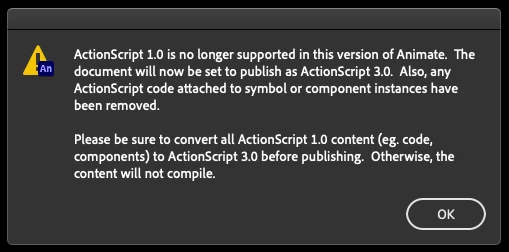
Actionscript 1.0 is no longer supported dialog...
  • July 23, 2021
  • 1 reply
  • 564 views


This dialog started showing up today. Never seen it before. 


I've been working with Animate for 20 years. I have no Actionscript 1.0 code in my docs, and even if I create a brand new doc, create only one Symbol in that doc, close and reopen, I still get this.


This is driving me nuts, as it presents four times every time I go to debug. And it is very slow to respond. 


Please tell me how to get rid of this!

    This topic has been closed for replies.

    1 reply

    kglad
    Community Expert
    Community Expert
    July 23, 2021

    i've only seen that when opening old fla that contain as1.  i haven't seen that in years.


    what animate version are your using?

    Inspiring
    July 24, 2021

    Latest version - 21.07.


    I did open a file which contained Actionscript 1.0 code. But after closing that file, restarting my iMac, and reinstalling Animate, I still get the dialog every time I use debug.


    As I mentioned, even if I create a new AS3 doc, and populate it with a single MovieClip, the dialog appears.


    kglad
    Community Expert
    Community Expert
    July 24, 2021

    report the bug here, https://www.adobe.com/products/wishform.html


    then, reset your preferences  - https://helpx.adobe.com/animate/using/set-preferences.html


    if that fails:


    uninstall animate including preferences, https://helpx.adobe.com/creative-cloud/help/uninstall-remove-app.html

    restart your computer

    reinstall animate