Participant
April 9, 2019
Answered

Adding Audio in Animate?

  • April 9, 2019
  • 1 reply
  • 2617 views

I'm currently working on an animated interactive video that will feature buttons; I'm creating the animated scenes in AfterEffects and have added sound. I've recently realised that in order to import my scenes to the stage in Animate, they will have to be imported in the form of an image sequence. Of course, this will mean me losing the sound from my video clips. However, I've thought about exporting my video clips afterwards as audio files in order to save the already edited audio. Would this work and how easy is it to add sound alongside scenes/image sequences in Animate? Sorry if this is a little vague, I haven't had a whole lot of experience in Animate and thats one of the reasons I'm working on this as a project.

Thanks
    This topic has been closed for replies.
    Correct answer n. tilcheff

    Hi mate!

    Short answer is: Very easy.

    1. Make sure your new project is ActionScript 3-based and not HTML5 Canvas

    2. Make sure you export your audio as 44kHz, 16-bit, WAV PCM.

    (MP3 will also work, but you may need to fiddle with settings if it does not work from first attempt. CBR probably, 160kbps, etc)

    --

    How to put audio on Timeline:

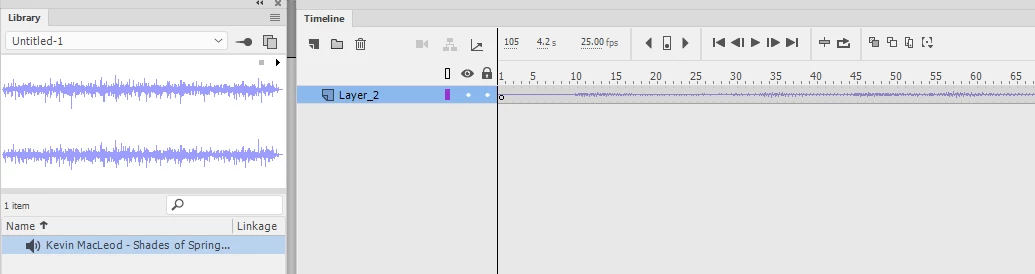
    1. Import your audio in Animate; files will appear in Library.

    (You should be able to drag audio files from an Explorer window into Animate also)

    2. Create a new blank layer (for audio)

    3. Select the first key and drag the audio from Library to Stage (not to Timeline). It will appear on the Timeline.

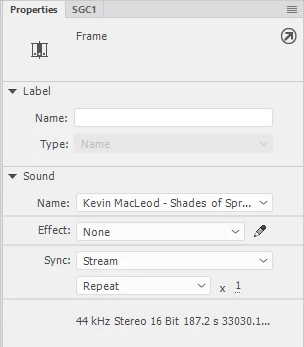
    4. Make sure the Sync setting in Properties is set to 'Stream'. It should be, because you dragged it to the Stage.

    (This means that audio will play from the timeline when you scrub the Play-head and will be in sync with your sequence)

    ---

    If you export to SWF, check the export settings and choose higher than the default quality for audio

    Good luck!

    NT

    1 reply

    n. tilcheff
    n. tilcheffCorrect answer
    Legend
    April 9, 2019

    Hi mate!

    Short answer is: Very easy.

    1. Make sure your new project is ActionScript 3-based and not HTML5 Canvas

    2. Make sure you export your audio as 44kHz, 16-bit, WAV PCM.

    (MP3 will also work, but you may need to fiddle with settings if it does not work from first attempt. CBR probably, 160kbps, etc)

    --

    How to put audio on Timeline:

    1. Import your audio in Animate; files will appear in Library.

    (You should be able to drag audio files from an Explorer window into Animate also)

    2. Create a new blank layer (for audio)

    3. Select the first key and drag the audio from Library to Stage (not to Timeline). It will appear on the Timeline.

    4. Make sure the Sync setting in Properties is set to 'Stream'. It should be, because you dragged it to the Stage.

    (This means that audio will play from the timeline when you scrub the Play-head and will be in sync with your sequence)

    ---

    If you export to SWF, check the export settings and choose higher than the default quality for audio

    Good luck!

    NT

    Nick - Character Designer and Animator, Flash user since 1998 | Member of the Flanimate Power Tools team - extensions for character animation