Participant
January 20, 2019
Answered

Adding sound in Adobe Animate 19.1

  • January 20, 2019
  • 1 reply
  • 434 views

Something has happened in my updated version of Adobe Animate 19.1.

The MP3 sound is imported into the library. It plays inside the library.
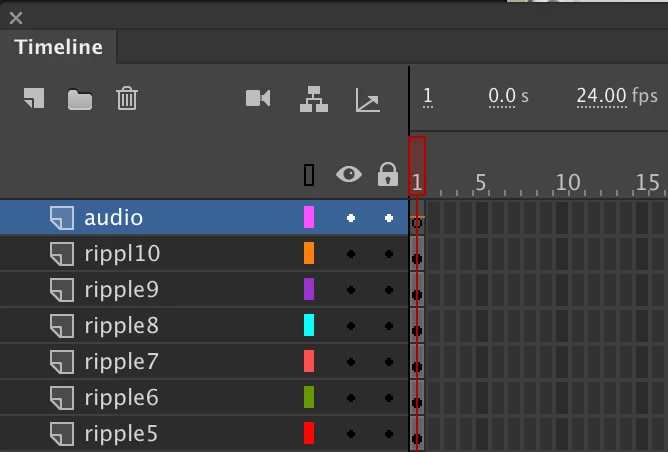
When it is being dragged to the stage the sign plus appears, the layer, however, remains empty but the line across the frame appears.

The property panel seems to not be recognising the sound as well.

Can anyone help me please?

Thank

Llena

    This topic has been closed for replies.
    Correct answer kdmemory

    Hi Elena

    Your audio layer is not empty. The line across is the horizontal axis of the waveform. Because it's only one frame you can see only a 24th second of the wave. Extend that layer to let's say 48 frames you should see a 2 secs wave in that layer.

    Now, when you publish the movie, is the sound playing? You are not explicitly writing that in your question. And what format are you going for. Is it HTML5/Canvas or Actionscript 3 or one of the AIR options? You are choosing this when you create a new document under Platform Type.

    If it is HTML5/Canvas it should be working in the browser. Look in the Properties panel underneath Synch if you want Repeat or Loop.

    If Actionscript 3 you have to make sure Synch is set to Event. And Repeat or Loop need to be decided too.

    For AIR I guess it's like AS3 but I haven't enough practice here to guide you.

    If the Properties panel doesn't recognise the sound, try another one.

    Klaus

    1 reply

    kdmemory
    kdmemoryCorrect answer
    Inspiring
    January 20, 2019

    Hi Elena

    Your audio layer is not empty. The line across is the horizontal axis of the waveform. Because it's only one frame you can see only a 24th second of the wave. Extend that layer to let's say 48 frames you should see a 2 secs wave in that layer.

    Now, when you publish the movie, is the sound playing? You are not explicitly writing that in your question. And what format are you going for. Is it HTML5/Canvas or Actionscript 3 or one of the AIR options? You are choosing this when you create a new document under Platform Type.

    If it is HTML5/Canvas it should be working in the browser. Look in the Properties panel underneath Synch if you want Repeat or Loop.

    If Actionscript 3 you have to make sure Synch is set to Event. And Repeat or Loop need to be decided too.

    For AIR I guess it's like AS3 but I haven't enough practice here to guide you.

    If the Properties panel doesn't recognise the sound, try another one.

    Klaus