
callumb38626137
Participant
February 17, 2017
Answered

Adobe Animate 2017.1 release Doesn't allow pressure sensitivity option with Wacom Tablet (Intuos Draw).

  • February 17, 2017
  • 2 replies
  • 546 views

So I've recently downloaded Adobe Animate and realised that when I draw with he tablet there isn't a Pressure Sensitivity option anywhere, I've tried all the drawing tools and no sensitivity option appears. I've looked at other forums, reinstalled my Wacom Drivers and reinstalled Adobe Animate. I really would like to use this software but it's hard to draw how I want when pressure isn't an option. Pressure Sensitivity works with Photoshop and other drawing applications I own. But not Adobe Animate. I would really appreciate if anyone can give me a true solution or let the Adobe Animators know what's happening. As lot's of people are experiencing this issue.

[Moved from non-technical Forum Lounge to specific Program forum... Mod]

[Here is the list of all Adobe forums... https://forums.adobe.com/welcome]
    This topic has been closed for replies.
    Correct answer UDESCO

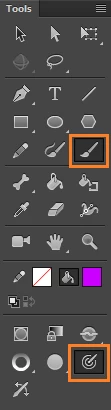
    You can use the Brush tool in Animate and enable Pressure sensitivity from the bottom of Tools Panel.

    Note that these options show up only when you draw using your Pressure sensitive tablet stylus and not with mouse.

    2 replies

    UDESCO
    UDESCOCorrect answer
    Participating Frequently
    February 22, 2017

    You can use the Brush tool in Animate and enable Pressure sensitivity from the bottom of Tools Panel.

    Note that these options show up only when you draw using your Pressure sensitive tablet stylus and not with mouse.

    callumb38626137
    Participant
    February 23, 2017

    Thank-you so much, I discovered why I couldn't find the sensitivity option this whole time. All the work spaces move the tool bar and the same amount of tools are always visible so I assumed these were the only tools available in that section, I was looking in the properties panel and everywhere through the options to find the sensitivity button. But looking at your screen shot made me realise there must be more tool options and I ended up dragging the tool bar out and discovering the rest. None of the pressure forums I saw suggested to extend the toolbar so I didn't know you could. Thank-you, I've corrected my silly mistake and for anyone else unable to find the sensitivity option, like me. Extend the toolbar.

    Preran
    Legend
    February 21, 2017

    That's strange. Let me ask around and see what they have to say.