
Participant
March 12, 2019
Answered

Adobe Animate Banner Ads

  • March 12, 2019
  • 1 reply
  • 1154 views

Hello,

I am working in Adobe Animate to create Google Banner Ads. I am having trouble saving the correct file type to be uploaded to our ad platform. It suggests uploading either a gif, HTML5 zip file, or an AMPHTML zip file. I know the platform type it is create in is HTML5 so am I just saving the file as an animate document then putting it in a ZIP folder? I fee like that wouldn't make sense. It sounds like an easy task and it probably is but i'm having trouble finding the answer.

Please help! Thank you!!!
This topic has been closed for replies.
Correct answer kglad

create an html5 project

save the fla to a new directory

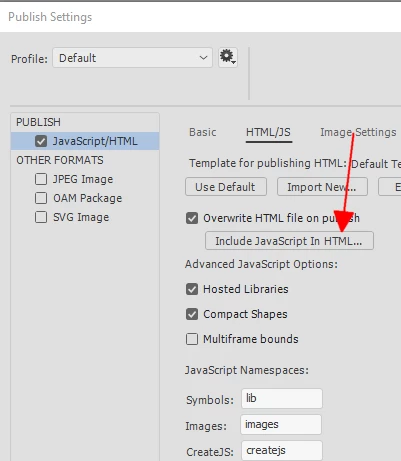
enable 'include js in html..' in the publish settings

when your project is complete use a zip utility to add everything in that new directory (except the fla) to a zip file.

upload the zip file to google.

1 reply

kglad
Community Expert
kgladCommunity ExpertCorrect answer
Community Expert
March 12, 2019

create an html5 project

save the fla to a new directory

enable 'include js in html..' in the publish settings

when your project is complete use a zip utility to add everything in that new directory (except the fla) to a zip file.

upload the zip file to google.