
Participating Frequently
May 12, 2022
Question

Adobe Animate Canvas import external image

  • May 12, 2022
  • 2 replies
  • 417 views

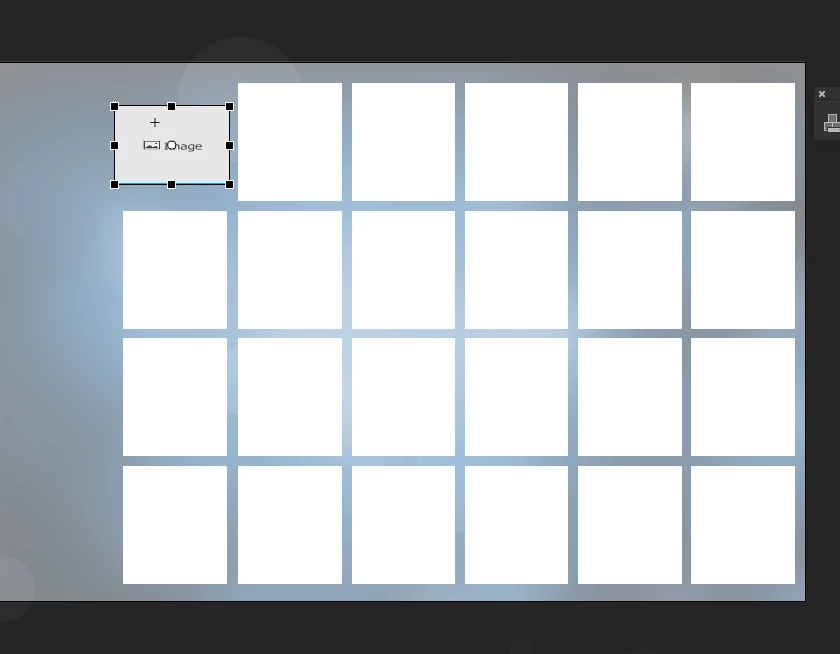
this might be a silly question: I am using animate CC image component (canvas) html5 to pull in external images "multiple" images if there is another way I would like to find out. the component doesnt allow "scale" in proportion. I have images that are horizonal & verical and I need all the images to scale proportionally.. is there a better way to do this with code. see attached for screenshot. just an example i need all the same size containers but I need the images to be scaled down proportionally. verically and vertically and aligned to fit with the white box area
    This topic has been closed for replies.

    2 replies

    Community Expert
    May 13, 2022

    Put JoãoCésar on your speed dial. He is really good with code. 

    JoãoCésar17023019
    Community Expert
    Community Expert
    May 12, 2022

    Hi.


    I think it's best to not use the image component in this situation because you may have problem with position and z index. It's better to use a manifest, PreloadJS and some grid math.
     
    Preview:
     
    JS code:
    var root = this;
    var container = root.container;
    var offsetX = 10;
    var offsetY = 10;
    var columns = 6;
    var imagePrefix = "image";
    var queue;
    
    var manifest =
    [
    	{id: "image0", src:"https://cdn.pixabay.com/photo/2015/12/01/20/28/road-1072821__340.jpg"},
    	{id: "image1", src:"https://cdn.pixabay.com/photo/2014/02/27/16/10/tree-276014__340.jpg"},
    	{id: "image2", src:"https://cdn.pixabay.com/photo/2015/06/19/21/24/avenue-815297__340.jpg"},
    	{id: "image3", src:"https://cdn.pixabay.com/photo/2021/08/25/20/42/field-6574455__340.jpg"},
    	{id: "image4", src:"https://cdn.pixabay.com/photo/2017/12/15/13/51/polynesia-3021072__340.jpg"},
    	{id: "image5", src:"https://cdn.pixabay.com/photo/2021/08/28/19/13/wheat-field-6581723__480.jpg"},
    	{id: "image6", src:"https://cdn.pixabay.com/photo/2017/10/10/07/48/hills-2836301__340.jpg"},
    	{id: "image7", src:"https://cdn.pixabay.com/photo/2015/11/16/16/28/bird-1045954__480.jpg"},
    	{id: "image8", src:"https://cdn.pixabay.com/photo/2016/08/11/23/48/mountains-1587287__480.jpg"},
    	{id: "image9", src:"https://cdn.pixabay.com/photo/2016/05/24/16/48/mountains-1412683__480.png"},
    	{id: "image10", src:"https://cdn.pixabay.com/photo/2021/07/19/22/07/mountains-6479150__480.jpg"},
    	{id: "image11", src:"https://cdn.pixabay.com/photo/2018/11/17/22/15/trees-3822149__480.jpg"},
    	{id: "image12", src:"https://cdn.pixabay.com/photo/2018/01/12/14/24/night-3078326__480.jpg"},
    	{id: "image13", src:"https://cdn.pixabay.com/photo/2012/08/06/00/53/bridge-53769__480.jpg"},
    	{id: "image14", src:"https://cdn.pixabay.com/photo/2021/11/13/23/06/tree-6792528__480.jpg"},
    	{id: "image15", src:"https://cdn.pixabay.com/photo/2016/11/23/13/48/beach-1852945__480.jpg"},
    	{id: "image16", src:"https://cdn.pixabay.com/photo/2021/08/18/19/02/trees-6556336__480.jpg"},
    	{id: "image17", src:"https://cdn.pixabay.com/photo/2015/07/31/06/50/forest-868715__480.jpg"},
    	{id: "image18", src:"https://cdn.pixabay.com/photo/2016/05/02/10/13/ship-1366926__480.jpg"},
    	{id: "image19", src:"https://cdn.pixabay.com/photo/2018/08/12/15/29/hintersee-3601004__480.jpg"},
    	{id: "image20", src:"https://cdn.pixabay.com/photo/2016/11/08/04/49/jungle-1807476__480.jpg"},
    	{id: "image21", src:"https://cdn.pixabay.com/photo/2014/07/16/05/18/beach-394503__480.jpg"},
    	{id: "image22", src:"https://cdn.pixabay.com/photo/2017/06/23/17/46/desert-2435404__480.jpg"},
    	{id: "image23", src:"https://cdn.pixabay.com/photo/2021/08/23/08/28/path-6567149__480.jpg"}
    ];
    
    function main()
    {
    	document.body.style.backgroundColor = lib.properties.color;
    	generateGrid();
    	queue = new createjs.LoadQueue();
    	queue.on("complete", loadComplete, root);
    	queue.loadManifest(manifest);
    }
    
    function loadComplete()
    {
    	placeImages();
    }
    
    function generateGrid()
    {
    	var i, thumb, thumbBounds, containerBounds;
    	var total = manifest.length;
    	
    	for (i = 0; i < total; i++)
    	{
    		thumb = new lib.Thumb();
    		thumbBounds = thumb.nominalBounds;
    		thumb.x = thumbBounds.width * 0.5 + (i % columns) * (thumbBounds.width + offsetX);
    		thumb.y = thumbBounds.height * 0.5 + Math.floor(i / columns) * (thumbBounds.height + offsetY);
    		root.container.addChild(thumb);
    	}
    	
    	containerBounds = container.getBounds();
    	container.x = (lib.properties.width - (thumb.x + thumbBounds.width * 0.5)) * 0.5;
    	container.y = (lib.properties.height - (thumb.y + thumbBounds.height * 0.5)) * 0.5;
    }
    
    function placeImages()
    {
    	var i, thumb, thumbBounds, image, bmp, bmpBounds;
    	var total = manifest.length;
    	
    	for (i = 0; i < total; i++)
    	{
    		thumb = container.children[i];
    		thumbBounds = thumb.nominalBounds;
    		image = queue.getResult(imagePrefix + i);
    		bmp = new createjs.Bitmap(image);
    		bmpBounds = bmp.getBounds();
    		
    		if (bmpBounds.width > bmpBounds.height)
    			bmp.scale = thumbBounds.width / bmpBounds.width;
    		else
    			bmp.scale = thumbBounds.height / bmpBounds.height;
    		
    		bmp.x = -bmpBounds.width * 0.5 * bmp.scale;
    		bmp.y = -bmpBounds.height * 0.5 * bmp.scale;
    		thumb.addChild(bmp);
    	}
    }
    
    main();
     
    Code / source / FLA:
     
    I hope it helps.
     
    Regards,
    JC