Participant
November 21, 2016
Question

Adobe Animate CC 2017 Mac

  • November 21, 2016
  • 2 replies
  • 1018 views

I installed Adobe Animate CC 2017 on a Mac and the "text size" option is not working.
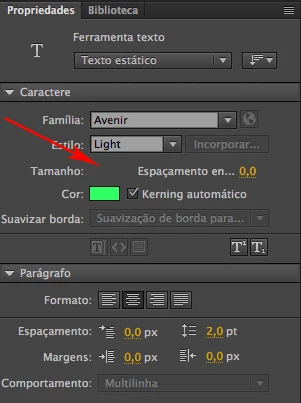
    This topic has been closed for replies.

    2 replies

    UDESCO
    Participating Frequently
    November 22, 2016

    Does the 'Text Size' option show when you expand the Properties panel width?

    It may be specific to a machine or Locale. Can you please specify the details of your machine and the Language/Locale you're using.

    We'll try to replicate this at our end.

    Participant
    November 22, 2016

    I had installed the Portuguese version (BR), so I uninstalled it and installed the English version. The English version is working correctly.

    Thank you all!

    kglad
    Community Expert
    Community Expert
    November 21, 2016

    try changing fonts and text type.

    Participant
    November 21, 2016

    I already did test with several Typographies, but the problem persists. I even changed the Defaut Mapping Font in the Preference menu and it did not work.

    kglad
    Community Expert
    Community Expert
    November 21, 2016

    uninstall animate (and, most importantly, remove your preferences when given the option at the start of uninstalling).

    then reinstall.
