


Inspiring
December 6, 2017
Answered

Adobe animate CC, Disabling a buttton

  • December 6, 2017
  • 3 replies
  • 932 views

Hello,

I've been working with animate for nearly a month now. I am trying to make a monitoring interface. there is just one little problem.

I have a button which i wish to disable under certain circumstances. The only way I have found is to disable the mouseEnabled propertie. Unfortunately this doesn't change the brightness of the button. The first thing i tried was to change the Alpha of the object but this turned out ugly since the shadow is visible underneath the object.
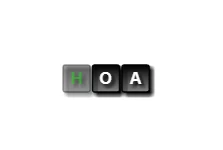
Is there anyone who knows a better way of doing this? Without using alpha?

This topic has been closed for replies.
Correct answer jarnek85287640

said object.mouseEnabled = false sorted this issue


3 replies

jarnek85287640AuthorCorrect answer
Inspiring
August 11, 2020

said object.mouseEnabled = false sorted this issue


Inspiring
December 6, 2017

I've found a solution. thanks tho!

kglad
Community Expert
Community Expert
December 6, 2017

you're welcome.

kglad
Community Expert
Community Expert
December 6, 2017

there are other ways to do it but the expected (by the user) way is to adjust the alpha.  if you want to adjust or remove the button's filter, do so.