


Participant
September 14, 2020
Question

Adobe Animate CC20 Volume Control / Effect not working

  • September 14, 2020
  • 1 reply
  • 249 views

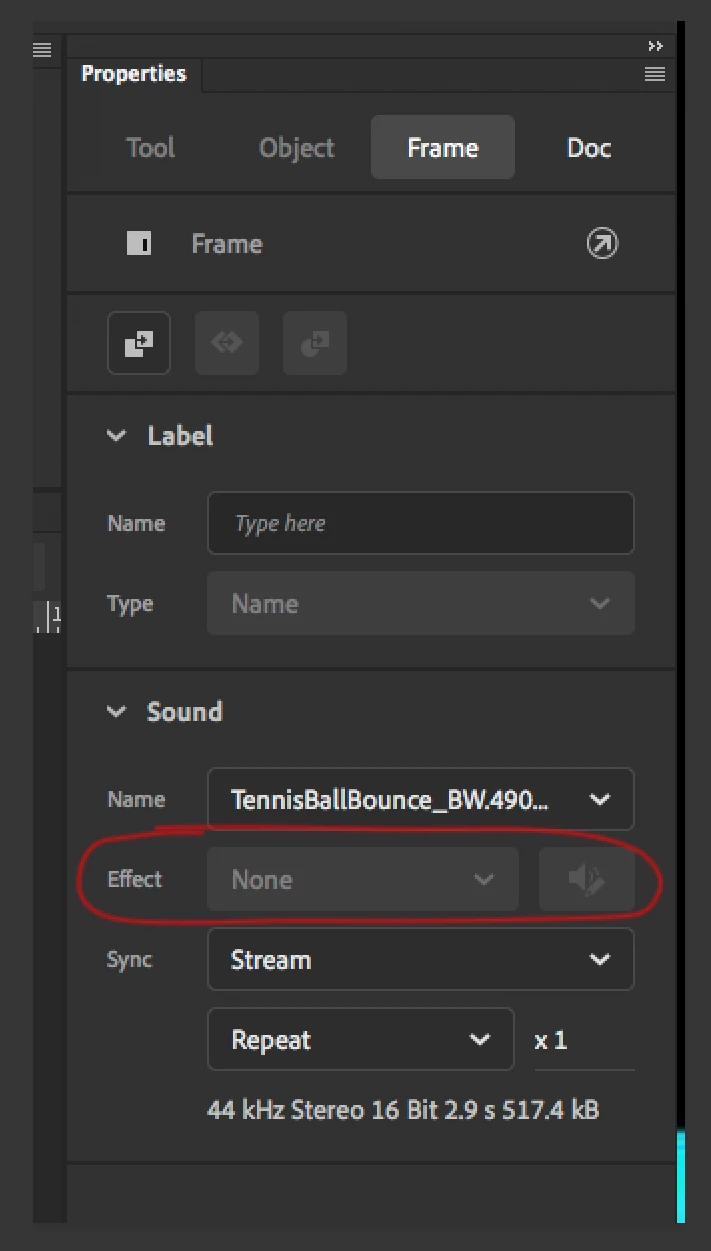
I am having issues with volume control on a simple Tennise Ball bounce sound. I tried using an MP3 and a Wav file but the software is not allowing me to sellect Effect pallet to do a custom volume control. Do I have to do anything before I can control the volume? I tried changing the sound to EVENT, STREAM and other things but the Effect Pallet will not highlight what so ever. What am I doing wrong 😞
    This topic has been closed for replies.

    1 reply

    kglad
    Community Expert
    Community Expert
    September 14, 2020

    that's not available for canvas/html5 files.  edit the sound envelopes in audition.

    Angel5E23Author
    Participant
    September 14, 2020

    Ohhhhh so what you are saying this animation is for web and since it's HTML5 you can't control volume. I would have to do a regular animation VS. HTML5. Did I get that right?

    kglad
    Community Expert
    Community Expert
    September 14, 2020

    the issue isn't html5/web.  the issue is animate when using html5/canvas.