
Participating Frequently
April 2, 2024
Question

Adobe Animate Error 1046 - But I don't have any code

  • April 2, 2024
  • 3 replies
  • 710 views

I made an animation that I am really proud of, but when I try to export it, I get these errors:
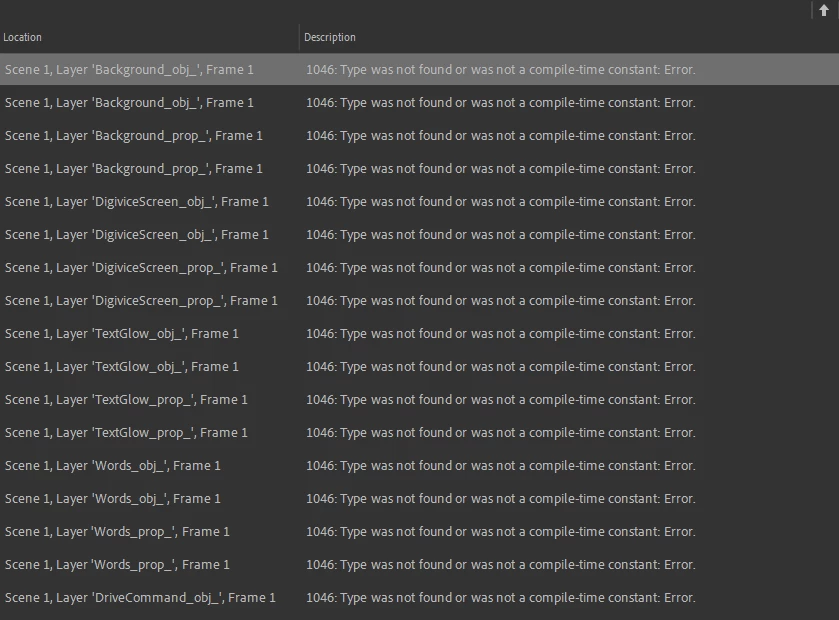

Most of the layers listed here don't even have objects on frame 1.

I tried looking up solutions online, but they all mention code and scripts. This animation features no codes or scripts. I checked multiple times.

I have no idea what could possibly be causing this and I REALLY want to be able to show this animation to other people and - y'know - use it.

Please help.

    This topic has been closed for replies.

    3 replies

    Participating Frequently
    May 6, 2024

    UPDATE:


    I hope anyone reading this is ready to be as pissed off as I am.
    I went through reconstructing the whole animation step by step. Frame by frame. Layer by layer. All to find what the problomatic element is.

    I found the issue to be with a single layer. One that had only contained a series of flashing pngs, no tweens and only a few instances of effects. So I didn't suspect it at all.
    But. And I hope you can feel an ounce of my anger when I tell you what the problem was.
    The layer was named
    "Error"
    It contained flashing images of error messages, ergo I named it "Error". But when I named it "Error". Adobe Animate.
    FOR SOME REASON.
    Flagged that as. An error.
    Because the layer
    Was named "Error".

    I think I lost years of my life, never mind the time spent getting here, Jesus Christ.

    Thank you for your help everyone

    JoãoCésar17023019
    Community Expert
    Community Expert
    May 6, 2024

    Hi.


    Thanks a lot for telling us the solution.

    The implementation of advanced layers has several conceptual and practical problems.


    This happened because when advanced layers is on each layer is turned into a Movie Clip instance and if an instance name is Error a conflict happens because Error is a top level class in AS3.


    Users that don't use code shouldn't have to worry about it.

    JoãoCésar17023019
    Community Expert
    Community Expert
    April 3, 2024

    Hi.


    Usually these random errors in documents that don't have code added by the user are caused by advanced layers. Are you using any feature that depend on those (camera, layer depth, layer parenting, layer effects)?


    If you are not, you can turn advanced layers off in the document settings.


    Pleaset let us know.


    Regards,

    JC

    Participating Frequently
    April 12, 2024

    Hi, sorry for taking long to respond

    I am using a camera layer, but it's nearly identical to one I used in other animations that hadn't faced this error.
    Or at least, I did all of the same things with it - namely I zoomed in at points and classic tweened at others.

    I've also used masks, but again, those haven't been a problem in other projects.
    Is there anything I can do to debug this with this knowledge?

    Thank you

    JoãoCésar17023019
    Community Expert
    Community Expert
    April 12, 2024

    It's possible that it's a bug related to the version of Animate. Which one are you using?

    I remember that a few years ago An used to have a lot of errors due to advanced layers.

    kglad
    Community Expert
    Community Expert
    April 2, 2024

    what's in your library?

    do you have a document class assigned?

    Participating Frequently
    April 3, 2024

    I have a lot of pngs, a good number of mp3s, a few graphics, one movie clip object, and about a hundred tweens
    But even right now I can export other projects with all the same components just fine so I really don't know what happened.

    What's a document class and how do I assign it?

    kglad
    Community Expert
    Community Expert
    April 3, 2024

    does anything have a linkage id assigned?