
Participant
Mar 8, 2024 8:16 AM UTC
Answered

adobe animate html5 canvas virtual camera

Hello, 

I am working in a project using HTML5 canvas and Javascript, 

The adobe animate virtual camera does not seem to be working with objects that are added using code.

For example

If I added the object from a libarary

var SomeObject = new lib.SomeObject ();

this object will be automatically pinned to the virtual camera,

I tried to unpin it for example using 

AdobeAn.VirtualCamera.getCamera(exportRoot).unpinCamera();

But I will get this error: 

Uncaught TypeError: Cannot create property 'parent' on number '10'

Any ideas?

Thank you
This topic is closed to new replies. Start a new post to keep the conversation going.
JoãoCésar17023019
JoãoCésar17023019Correct answer
Community Expert
Mar 8, 2024 11:35 AM UTC

Hi.


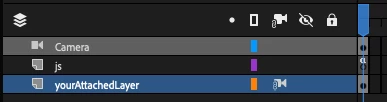
One way of solving this is to add your instance to a layer instead of adding it directly to the root. For example:


this.yourAttachedLayer.addChild(someObject);


I hope this helps.


Regards,

JC

3 replies

JoãoCésar17023019
Community Expert
JoãoCésar17023019Community ExpertCorrect answer
Community Expert
Mar 8, 2024 11:35 AM UTC

Hi.


One way of solving this is to add your instance to a layer instead of adding it directly to the root. For example:


this.yourAttachedLayer.addChild(someObject);


I hope this helps.


Regards,

JC

Translate
Participant
Mar 8, 2024 7:09 PM UTC

Yes that worked, thank you for your help 😃

Translate
JoãoCésar17023019
Community Expert
Community Expert
Mar 8, 2024 9:01 PM UTC

You're welcome!

Translate