
Inspiring
September 13, 2021
Answered

Adobe Animate Missing Breadcrumb Bar

  • September 13, 2021
  • 1 reply
  • 300 views

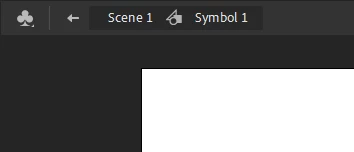
In every tutorial I'm seeing online, when you double click on a symbol, there will be a breadcrumb in the main window where you can click back up to the main scene. My version is not showing that at all (v20.5.1), the only way I can find to get back to the main scene is by opening the Scene Window. Am I missing a setting somewhere that reveals the breadcrumb bar?
    This topic has been closed for replies.
    Correct answer Jjjj5d

    You know what? I ran an update and now the breadcrumbs are showing. I guess it was some kind of glitch with my installation. ¯\_(ツ)_/¯

    1 reply

    Mario_CR
    Community Expert
    Community Expert
    September 13, 2021

    That's weird, it should be embedded with the stage window, I don't think there's an option to tear, disable or even hide it, even in full-screen mode. Try resseting your workspace by going to Window > Workspaces > Reset ("current workspace").

    You can also double click on an empty area when inside a symbol to go back to the main stage.

    Jjjj5dAuthor
    Inspiring
    September 14, 2021

    Ok, the double click thing works to get back to th scene quickly, but I tried reseting the workspace and still no breadcrumbs. This is what my stage window looks like when I double click into a symbol:

    Kind of annoying.

    Jjjj5dAuthorCorrect answer
    Inspiring
    September 14, 2021

    You know what? I ran an update and now the breadcrumbs are showing. I guess it was some kind of glitch with my installation. ¯\_(ツ)_/¯