April 20, 2021
Answered

adobe animate paint bucket masks?

  • April 20, 2021
  • 1 reply
  • 535 views

I have followed the steps of a tutorial exactly

Create shape > fill > select fill > copy fill > erase fill > new layer > paste fill > make layer mask

However when I do it for some reason the fill keeps going over my lines and I don’t know why

Is there something I am doing wrong?


even when i am noting creating a mask the copied fill pastes over my lines instead of in them

    This topic has been closed for replies.
    Correct answer n. tilcheff

    OK. It's clear now.


    You're not doing anything wrong.

    The line/stroke is a centerline, which means that the thickness is on both sides of the stroke, and then when the green fill is on a layer above, it covers this inner half of the thickness.


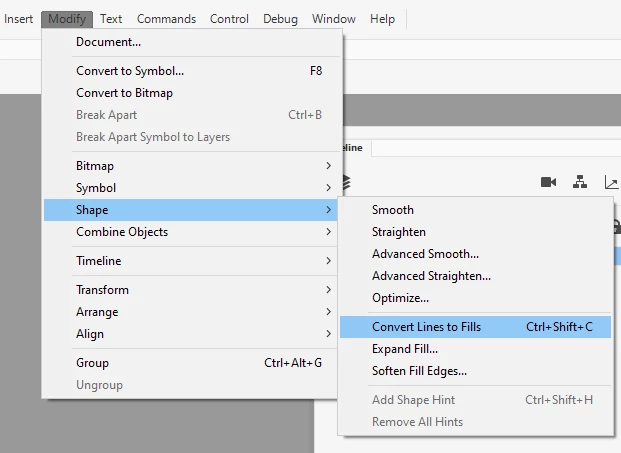
    To avoid this, convert the stroke to a fill by using Modify > Shape > Convert Lines To Fills before you cut the green fill.

    Then there will be no overlap.


    1 reply

    n. tilcheff
    Legend
    April 20, 2021

    If you provide a couple of screen grabs someone might be able to understand exactly what the problem is and help.


    Nick - Character Designer and Animator, Flash user since 1998 | Member of the Flanimate Power Tools team - extensions for character animation
    April 20, 2021

    n. tilcheff
    n. tilcheffCorrect answer
    Legend
    April 20, 2021

    OK. It's clear now.


    You're not doing anything wrong.

    The line/stroke is a centerline, which means that the thickness is on both sides of the stroke, and then when the green fill is on a layer above, it covers this inner half of the thickness.


    To avoid this, convert the stroke to a fill by using Modify > Shape > Convert Lines To Fills before you cut the green fill.

    Then there will be no overlap.


    Nick - Character Designer and Animator, Flash user since 1998 | Member of the Flanimate Power Tools team - extensions for character animation