
Participating Frequently
January 7, 2017
Answered

Adobe Animate Publish Settings

  • January 7, 2017
  • 3 replies
  • 2211 views

Is anyone having an issue with Animate's publish settings the last 24 hours (today is 1/7/2017)? I've made dozens of web pages using Animate the past few months, and consider myself at least an intermediate user if not an expert, but for some reason today my publish settings are not working. When I publish a file, or when I simply test my page inside Animate, Animate is making everything "fit to screen" when it was not doing so last night with the exact same settings (no matter the browser I use either...and I've tried 4 browsers). Is anyone having the same issue? I have tried every setting possible but I get the same result. I know the publish settings inside and out so I am wondering if anyone is having the same issue...i.e. is it a bug? I love Adobe in every respect otherwise. Thank you.
    This topic has been closed for replies.
    Correct answer kglad

    FYI I am able to publish an .oam file just the way I want. Works perfectly.

    I will certainly insert your code but I cannot believe Adobe Animate forces a "fit to screen" html project. I know you don't work for them but it has to be a bug they need to fix. Again it is not your problem.

    Thank you again for all of your help kglad. I'll let you know what happens.


    i've done more testing and that third parameter is 'true' if you publish with scale to fill enabled.  the responsive setting can be width, height or both.

    3 replies

    Participating Frequently
    January 8, 2017

    kglad
    Community Expert
    Community Expert
    January 8, 2017

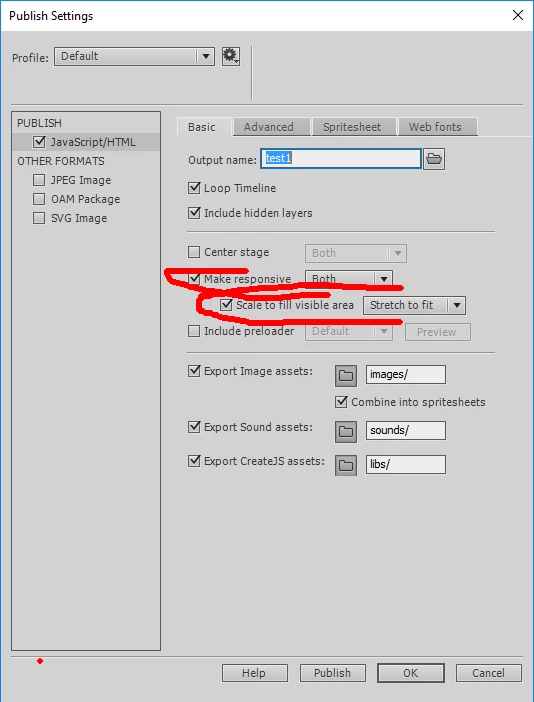
    that's one of the two screenshots i requested and it shows the exact problem i mentioned in message 5.  i'll repeat it again, "if you're trying to publish a fixed sized html, untick 'make responsive'".

    Participating Frequently
    January 8, 2017

    I hear you...but I am not trying to publish a fixed size html. Last night I was able to publish 1280 by 4000 html and it would appear like any webpage (it would not fill to page) and was responsive. Why is it that the entire 1280 by 4000 stage has to fit to the browser view now whereas yesterday it did not. Of course I appreciate your help...but its frustrating. Here is the second screen shot.

    Thank you very much again.

    Participating Frequently
    January 7, 2017

    No I do not get a message 12.

    This is just bizarre. My stage size is 1280 by 4000...and no matter the publish setting I chose when I publish or test I get the view like I sent you earlier as fit to page. Animate was allowing me to scroll up and down the page while still responsive just yesterday. I am stumped and surprised no one else has the same problem.

    kglad
    Community Expert
    Community Expert
    January 7, 2017

    attach screenshots of your publish settings>basic and advanced

    kglad
    Community Expert
    Community Expert
    January 7, 2017

    what are you publishing?  an as3 project? html5? something else?

    Participating Frequently
    January 7, 2017

    html5?

    Participating Frequently
    January 7, 2017

    It's a pleasure to connect with you by the way. I've seen your profile in a number of these forums.