
June 15, 2023
Answered

Adobe Animate Shrinking Layers Help

  • June 15, 2023
  • 2 replies
  • 596 views

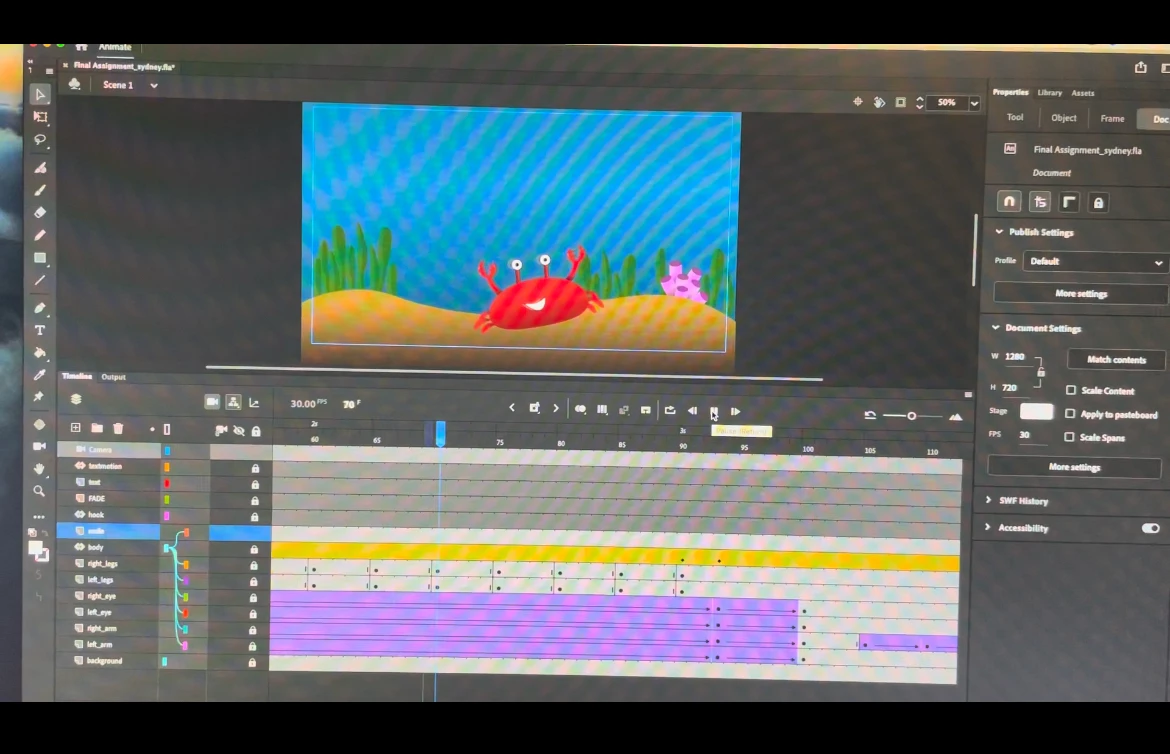
Hi, I just finished a school project that took me SO LONG to get done (beginner here) I finished animating and went to export, everything looked good! Media Encoder took foreverrrr and then eventually it just quit out of both the encoder and my animate application. I had everything saved but when I played it back a few parts were messed up. PLEASE HELP. attached is a photo. I cannot figure out why my animations limbs are shrinking???
Correct answer Mario_CR
I can recreate the problem; it has something to do with combining classic tweens with motion tweens and parenting layers to motion tweened symbols. Remove the motion tween of the 'body' layer (right click > Remove Motion Tween), you'll notice this gets rid of the shrinking; once done recreate the movement using classic tweens only.

2 replies

Mario_CR
Community Expert
Mario_CRCommunity ExpertCorrect answer
Community Expert
June 15, 2023
I can recreate the problem; it has something to do with combining classic tweens with motion tweens and parenting layers to motion tweened symbols. Remove the motion tween of the 'body' layer (right click > Remove Motion Tween), you'll notice this gets rid of the shrinking; once done recreate the movement using classic tweens only.
June 15, 2023

Thank you so much this worked out so well!! I was so stresssed I had to start over ... THANK YOU THANK YOU

Mario_CR
Community Expert
Community Expert
June 15, 2023

You're welcome, I made a bug report to the dev team as well since this shouldn't be happening.

kglad
Community Expert
Community Expert
June 15, 2023

do you see the problematic tweens when checking your timeline within animate?