
Adobe Animate won't NOT give me an alpha channel.
Long story short: whether I tell Adobe Animate to export with an Alpha channel or not, it does. I’ll attach a screen grab of my export settings, which I’ve used for years.
More background: I never change the export settings in Animate. This is how it’s set up in my pipeline.
I was having problems with a project exporting involving partial transparencies and pulling them into Premiere. I tried out a couple of different settings (eg Apple ProRez) to see if that worked any better. It did not.
I ultimately thought of a way to get where I was going without generating an Alpha channel from Animate. But when I turned off “ignore stage color,” Animate / QuickTime continue to generate an alpha channel – which is what was causing me fits in the first place.
I found a work-around by placing a solid at the bottom of the layer stack, and telling Premiere to ignore the alpha channel on the resulting MOV file, but I’d like to resolve this.
I tried uninstalling Animate and its settings/preferences and then re-installing it. Made no difference.
Maybe I’m hallucinating that I’ve always exported in QuickTime / Default (Animate)?
I’m stuck. Any suggestions welcome.
*ps - Yes I tried turning alpha ON to get it to turn OFF. Didn't work.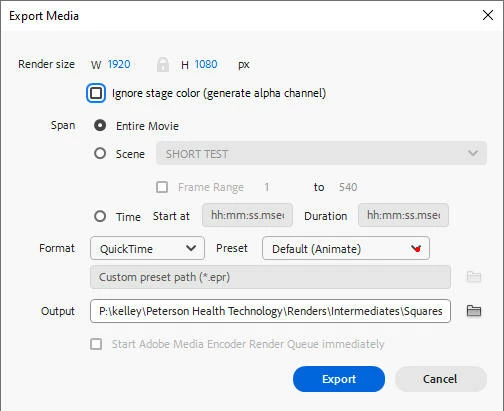


 AdChoices