



Firewood:D
Inspiring
Aug 20, 2023 1:13 PM UTC
Answered

An error was thrown when selecting a layer using jsfl

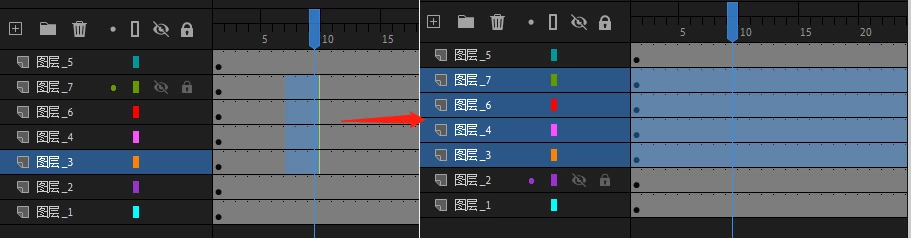
Select a column of frames on the timeline, and then execute the command to select these layers, the following code will throw“Error: setSelectedLayers:Invalid parameter number 1”,
How can it be improved, and where is it wrong?
 

var selectedFrames = fl.getDocumentDOM().getTimeline().getSelectedFrames();
var selectedLayers = [];
for (var i = 0; i < selectedFrames.length; i++) {
	var currFrame = selectedFrames[i];
	var currLayer = currFrame.layer;
	if (selectedLayers.indexOf(currLayer) === -1) {
		selectedLayers.push(currLayer);
	}
}
if (selectedLayers.length > 0) {
	fl.getDocumentDOM().getTimeline().setSelectedLayers(selectedLayers);
}



This topic is closed to new replies. Start a new post to keep the conversation going.
DaniilSV
DaniilSVCorrect answer
Participant
Aug 20, 2023 3:28 PM UTC

The problem is that you are not using functions correctly.
The "selectedFrames" function returns, as the documentation says: "An array containing 3n integers, where n is the number of selected regions. The first integer in each group is the layer
index, the second integer is the start frame of the beginning of the selection, and the third integer specifies the ending
frame of that selection range", array does not contain frames, and frames do not contain a "layer" property.
Also, the "setSelectedLayers" function takes as the first argument the index of the desired layer to be selected.
Here is the correct code

var document = fl.getDocumentDOM();
var timeline = document.getTimeline();
var layers = timeline.layers;

var selectedFrames = timeline.getSelectedFrames();

for (var i = 0; i < selectedFrames.length; i += 3) {
	var [layerIndex, rangeBegin, rangeEnd] = selectedFrames.slice(i, i + 3);

	timeline.setSelectedLayers(layerIndex, i == 0 ? true : false);
}

5 replies

DaniilSV
DaniilSVCorrect answer
Participant
Aug 20, 2023 3:28 PM UTC

The problem is that you are not using functions correctly.
The "selectedFrames" function returns, as the documentation says: "An array containing 3n integers, where n is the number of selected regions. The first integer in each group is the layer
index, the second integer is the start frame of the beginning of the selection, and the third integer specifies the ending
frame of that selection range", array does not contain frames, and frames do not contain a "layer" property.
Also, the "setSelectedLayers" function takes as the first argument the index of the desired layer to be selected.
Here is the correct code

var document = fl.getDocumentDOM();
var timeline = document.getTimeline();
var layers = timeline.layers;

var selectedFrames = timeline.getSelectedFrames();

for (var i = 0; i < selectedFrames.length; i += 3) {
	var [layerIndex, rangeBegin, rangeEnd] = selectedFrames.slice(i, i + 3);

	timeline.setSelectedLayers(layerIndex, i == 0 ? true : false);
}
Translate
Firewood:D
Inspiring
Aug 21, 2023 2:37 AM UTC

You are right, thank you very much for the detailed explanation

Translate
kglad
Community Expert
Community Expert
Aug 20, 2023 3:21 PM UTC

setSelectedLayers selects one layer at a time.  using the 2nd parameter you can can select more than one, but you select one at a time. ie, you want to loop through the selected layers.


Translate
Firewood:D
Inspiring
Aug 21, 2023 2:35 AM UTC

Thanks! I'm still learning, thanks for pointing out the problem,

Translate
kglad
Community Expert
Community Expert
Aug 21, 2023 2:38 AM UTC

you're welcome.

Translate