


Jeffery.Wright
Inspiring
September 21, 2026
Question

Animate 24.0.15 Stroke Selected property inspector tab only shows Doc active?

  • September 21, 2026
  • 10 replies
  • 24 views

Why can’t I change the properties of my selected stroke?
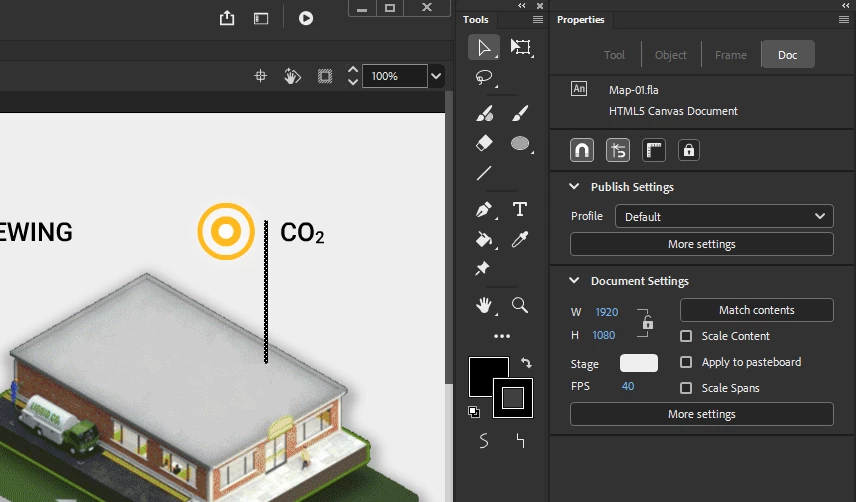
 

Stroke is selected, but I can’t edit its style?

What’s going on, here?


Thanks. 


    10 replies

    Jeffery.Wright
    Inspiring
    September 21, 2026
    Text selected...
    Clip selected…

    This must be a bug.

    Processor    13th Gen Intel(R) Core(TM) i7-13700K   3.40 GHz
    Installed RAM    64.0 GB (63.7 GB usable)
    System type    64-bit operating system, x64-based processor
    Edition    Windows 11 Enterprise
    Version    23H2
    OS build    22631.7517

    NVIDIA GeForce RTX 3070


    Jeffery.Wright
    Inspiring
    September 21, 2026

    It’s very odd, earlier versions never had this problem, I don’t remember this ever being an issue before, thanks. 

    JoãoCésar17023019
    Community Expert
    Community Expert
    September 21, 2026

    Hi.


    That seems to be a bug on Windows, because I have the same version installed for macOS and it is working.


    Does it persist if you go to another symbol or create/open another document?


    Please let us know.


    Regards,

    JC

    Jeffery.Wright
    Inspiring
    September 21, 2026

    If I have nothing selected, then select a stroke, a clip or even text, only the Doc tab is active. This is random and intermittent, Sometimes the Object tab does activate, but not predictably. 

    kglad
    Community Expert
    Community Expert
    September 21, 2026

    double click it.

    Jeffery.Wright
    Inspiring
    September 21, 2026

    Thanks, yeah, I did double click it.
