


Participating Frequently
June 13, 2024
Question

Animate CC Crashes when trying to click #HEX field in colour picker!

  • June 13, 2024
  • 5 replies
  • 1022 views

A shot in the dark -


MacOS, Animate CC 2024, latest, 2021 Intel Macbook Pro with 32 GB RAM.


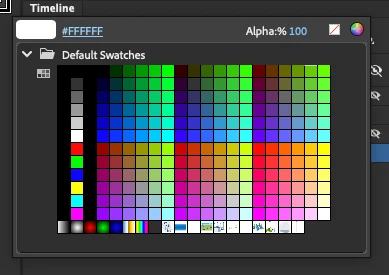
I click the colour picker on my toolbar, bring up the colour swatches, and then click the field above it with the colour hexcode. As soon as I click on it (to copy, or type a new colour value), Animate pauses, then crashes.


Same goes if I use the Color Panel or the Gradient Panel, wherever I go to type in a colour value.


It's as if Animate can't handle me typing in colour values. Not sure what's happening. This is a fresh install with reset preferences. I've also set Accessibility Options in MacOS system settings, to no avail.


This is very repeatable, as every time I click that little #FFFFFF to manually give a colour value, it crashes Animate.


    5 replies

    Yann Bonnin
    Participating Frequently
    September 9, 2025

    Hello,
    To follow up on my previous post, and yours, please note that even with version 23, the problem persists.
    It is therefore much older than version 24. It crashes as soon as you use the colour chart, whether to enter a value in the HEX box or even select a colour. There is no real logic to it. I have to save systematically after each creation or modification. After about ten operations, regardless of what they are, the application crashes... It remains very random. 
    It's really very tedious all day long, we waste a lot of time. I'll try to disable the GPU... (iMac 27 / 3,8 Ghz Intel core i7 8 cores / 128 Go Ram / 16 Go VRAM)

    Toujours avoir un plan B ! / Having always a B plan!
    _keyframer
    Community Expert
    Community Expert
    September 16, 2025

    Same here. I may need to go as far back as possible with Animate. I hadn't used it in over a year and these issues I don't experience with any other software on my M1. My next hurdle is why File > New doesn't work but I invented a work-around my opening up from a template and then modifying it. 
    I'm also stunned at how long it takes the start screen to launch amongst other glaring issues. Oh well.

    Animator and content creator for Animate CC
    Yann Bonnin
    Participating Frequently
    August 26, 2025

    Hello,
    Same problem with Animate 2024 on Mac with Sequoia. Upgraded from Monterey, which worked fine, but became increasingly incompatible with Adobe (Photoshop and After Effects). It's really annoying!

    Toujours avoir un plan B ! / Having always a B plan!
    kglad
    Community Expert
    Community Expert
    August 26, 2025

    @Yann Bonnin 


    try a different animate version.

    Yann Bonnin
    Participating Frequently
    August 26, 2025

    Thank you very much, kglad! With the 23, it runs normally.
    May the Great Spirit grant you his kindness for that. You already have mine.
    Yann

    Toujours avoir un plan B ! / Having always a B plan!
    Participant
    June 2, 2025

    me too

    MagicFred
    Participating Frequently
    June 3, 2025

    My current solution : 
    - MacOS Ventura 13.7.4 reinstalled (big issues with Sonoma and Sequoia)
    - Adobe Animate 2023 (v 23.0.00)
    No crash with the colour picker.
    Still crash rarely for no reason

    Mario_CR
    Community Expert
    Community Expert
    June 13, 2024

    I've seen a few people complain about this, seems to be a bug on Animate 24 on Mac.

    Report the bug from this link.

    As a workaround, rollback (to Animate 23) in the meantime.

    MagicFred
    Participating Frequently
    March 3, 2025

    Samr ussie with 2023 and 2024

    kglad
    Community Expert
    Community Expert
    June 13, 2024

    did you confirm a successful preference reset by seeing something you'd customized being reset to default?

    Participating Frequently
    June 13, 2024

    Yes, I did. Lost some preferences I'd set up, and it still happens. 
    Click any colour picker, then click the hex code field to change it into a text box, it crashes/quits, still.

    Participating Frequently
    June 13, 2024

    Not sure if this helps, but the TLDR I get in Console is:


    Crashed Thread: 0 Dispatch queue: com.apple.main-thread

    Exception Type: EXC_BAD_ACCESS (SIGSEGV)
    Exception Codes: KERN_INVALID_ADDRESS at 0xffffffff00000000
    Exception Codes: 0x0000000000000001, 0xffffffff00000000

    Termination Reason: Namespace SIGNAL, Code 11 Segmentation fault: 11
    Terminating Process: Adobe Animate 2024 [1248]