
Participant
March 12, 2019
Answered

Animate CC Font Blurry? What happened to anti-alias for animation?

  • March 12, 2019
  • 1 reply
  • 2939 views

When I did animations in Flash, if I selected "anti-alias for animation", my fonts would come out nice and crisp and clear.

Now that I am having to use Animate CC, that option is now greyed out and my fonts are now less crisp.
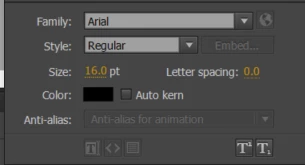
The two Animate books I have of course make no mention of this problem nor how to ensure clear text.

Whenever I google anything about Animate, I get lots of posts from like 10 years ago or that talk about AS2 

Any suggestions?

    This topic has been closed for replies.
    Correct answer GoryGreg

    Hi,

    two tips to try.

    Place a text box on whole pixels in the Properties panel e.g. if the x is on 5.1 and y is on 6.7 for your text box, then change these so the x to be 5 and the y to be 7.

    Also, you could try dynamic text for crisp text.

    Cheers.

    1 reply

    JoãoCésar17023019
    Community Expert
    Community Expert
    March 12, 2019

    Hi.

    You're probably using an HTML5 Canvas document.

    This kind of document doesn't have anti-alias options.

    You can use an AS3 document but of course it depends upon the kind of output you're targeting.

    Please let us know.

    Regads,

    JC

    johnm757Author
    Participant
    March 12, 2019

    Yes, I am using HTML5 Canvas.

    With .swf/flash's impending death, we have been told to no longer use it.

    Thanks for letting me know that anti-alias is definitely not an option.

    Is there something similar?

    If I use an animate animation on a web based training page in place of a flash, the clarity of the font between the animation and the page it is on is noticeable.

    GoryGregCorrect answer
    Inspiring
    March 12, 2019

    Hi,

    two tips to try.

    Place a text box on whole pixels in the Properties panel e.g. if the x is on 5.1 and y is on 6.7 for your text box, then change these so the x to be 5 and the y to be 7.

    Also, you could try dynamic text for crisp text.

    Cheers.