



Animate CC - HTML5 Canvas - Make responsive?
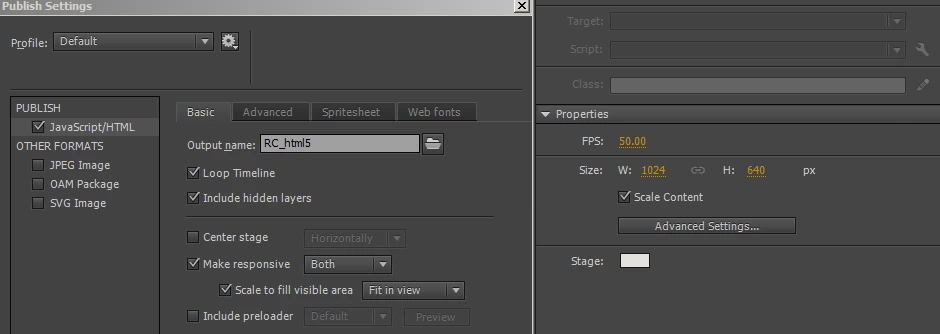
I would like my interactive application to expand to the browser window width, these seemed like just the settings to make that happen, but they do not work.
Any idea then, what these parameters are for?
The app on the page will be used as a full screen exhibit for a touch screen, and also viewed on phones and in iframes on web sites, this is the published result viewed in an iPhone 6 sized window, the canvas did not respond at all:
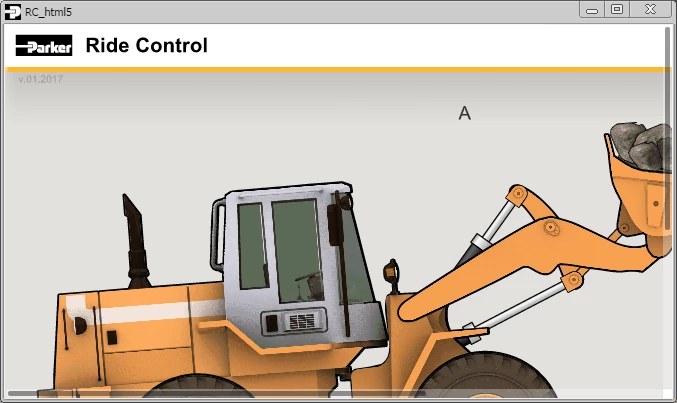
I even changed the parameters in the html to accommodate this, also to no avail. Any suggestions?
<div id="animation_container" style="background-color:rgba(226, 225, 221, 1.00); width:100%; height:100%">
<canvas id="canvas" width="100%" height="100%" style="position: absolute; display: block; background-color:rgba(226, 225, 221, 1.00);"></canvas>
<div id="dom_overlay_container" style="pointer-events:none; overflow:hidden; width:100%; height:100%; position: absolute; left: 0px; top: 0px; display: block;">
</div>
</div>
You can see the interactive in real time here, if that helps: http://corpapps.parker.com/corpapps/Interactives/Ride_Control/RC_html5.html
Thanks!


 AdChoices