

SSSSSSBenay
Known Participant
September 28, 2017
Answered

Animate Ease values disappearing since update!

  • September 28, 2017
  • 3 replies
  • 376 views

Hello Friends,

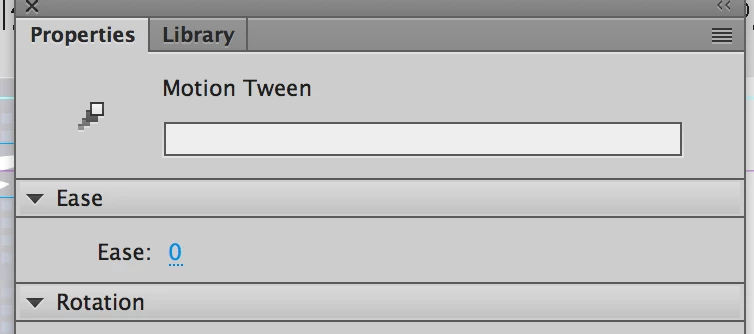
I have encountered a very frustrating issue. Since updating Animate CC, the Ease values that I have set for many simple tweens in former files are now gone! Also, when I re-enter ease values, sometimes they stay and sometimes they get erased after saves, publishes, closing/opening the document, etc. What is going on? I've read that there were some updates/improvements made to the custom Ease function, however I have always just entered a value into the Properties panel in order to achieve a simple ease in/out for each tween. Where are these numbers disappearing to? Please help!
This topic has been closed for replies.
Correct answer Colin Holgate

I was giving the answer to the question about Classic tweens. I see now that you're using Motion tweens. For me I can enter a value and save the file, and it's still there when I open the file.

If you can find some steps that always make it go wrong, you could enter a bug report here:

Feature Request/Bug Report Form

3 replies

SSSSSSBenay
Known Participant
September 29, 2017

Ah, ok, I will report the bug. When I open any file that was created before the Animate update, all the custom Motion tweens have Eases reset to 0, and this was not the case in the original file. I am having to go back and re-enter the Ease values...

SSSSSSBenay
Known Participant
September 28, 2017

Thanks for your quick reply Colin. But I am confused... In the Properties panel, I still see "Ease" with a field to enter in the desired value. Where is the "Intensity" control located? Also, I do not have any Ease options such as "Linear." ? I am running the Animate 2017.5 Release.

Colin Holgate
Colin HolgateCorrect answer
Inspiring
September 28, 2017

I was giving the answer to the question about Classic tweens. I see now that you're using Motion tweens. For me I can enter a value and save the file, and it's still there when I open the file.

If you can find some steps that always make it go wrong, you could enter a bug report here:

Feature Request/Bug Report Form

Colin Holgate
Inspiring
September 28, 2017

There are a lot of easing presets now. The 'Ease' value is now called Intensity, and it only applies to the Linear ease. Make sure Linear is selected, and then use the Intensity value like you used to use the Ease value.