joechump
Inspiring
November 24, 2016
Answered

Animate Free Transform Issues - Mac

  • November 24, 2016
  • 1 reply
  • 1568 views

Ok, upgraded to Animate CC on Mac. Serious disappointment so far. It crashes just like CS 6 did. But here's a basic issue which makes it unusable for me currently:

I create an object and group it. Then group this together with some other objects (e.g. a mix of grouped objects and regular drawn shapes.) This simulates a normal collection of artwork grouped together.

Now use the free transform tool to resize the nested group (with Shift held down of course.) Objects start to move out of their bounding boxes and slide around/ away from each other.

What is going on here?

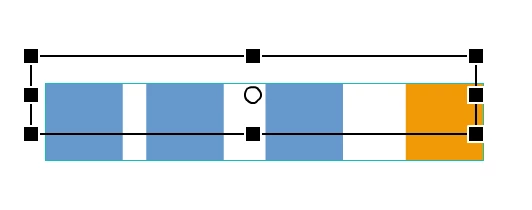
So in the examples below, the three blue rectangles are each groups and the orange one is just a regular shape. When grouped together and resized with the free transform tool, the blue groups shrink and move in relation to the orange one where they should stay in proportion. Sometimes some grouped shapes even slide out of the bounding box (e.g. the squares image below which were evenly distributed before resizing.)

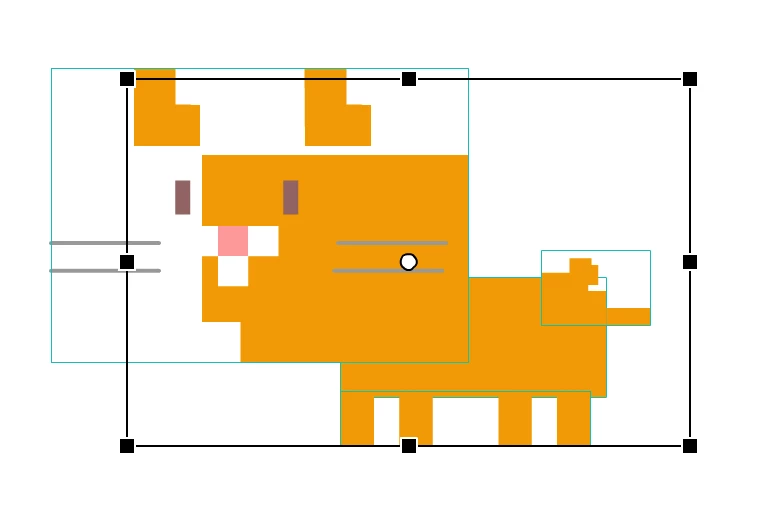
With the cat below also, which is a collection of groups and regular shapes - some nested some not so that I can keep the elements separate, as I resize, the grouped objects begin to slide left out of the bounding box making poor kitty look like roadkill.

Also undo doesn't always put them back to the correct positions indicating that Animate is somehow completely screwing up the positioning data of different objects as they are resized.

Please help as CS6 handles this ok but Animate CC seems to have some major bugs/flaws. Unless I'm missing some obvious setting which I truly hope I am. I need this to work.

   

This topic has been closed for replies.
Correct answer joechump

Thanks kglad, just to confirm, it had this issue on the PC version also?


This from Adobe:

"Thanks for reaching out to us. Just want to let you know that we are aware of this issue and working on a fix. Will update you as soon as the fix is available."

Phew, so at least I'm not going crazy and hopefully this will be fixed soon. Until then I will have to use my constantly crashing CS6 version.

I'm just glad that it's being taken seriously as I still love Flash/Animate  CC and I can create graphics so much quicker than in Illustrator.

1 reply

kglad
Community Expert
Community Expert
November 24, 2016

each object in your group will scale per its (ie, the object's) reg/transform point.

if you don't understand how that works, try moving each object's transform point to the object's center and see if that does what you want.

joechump
joechumpAuthor
Inspiring
November 24, 2016

Thanks, I understand what you mean but that's completely impractical and makes no logical sense. If a collection of objects is grouped together in a larger group then (and the way this has always worked in the past) the registration point of the overarching group should override the nested objects contained within. It's how it works in virtually every piece of software ever made (Illustrator, InDesign etc etc) and how it always worked in Flash for the last 18 years. Why would anyone want to attempt to change the registration point of each object within a group - which would take forever to attempt to align, wasting time and risking being inaccurate anyway? All objects in a group should scale in relation to each other regardless of what those objects are and what their individual registration points are. This makes no sense to me.

kglad
Community Expert
Community Expert
November 24, 2016

i agree.

submit a bug/feature request, Feature Request/Bug Report Form