
gameryon
Participant
August 10, 2019
Answered

Animate is processing strokes. Please wait. stuck at 0%

  • August 10, 2019
  • 1 reply
  • 3534 views

The past few days I have using this program everything was fine, but today I can't do anything. Even if I do 1 stroke and try to save a pop up stops me and just stays there forever. After waiting for some time i've noticed that Animate started consuming lots of space on my computer making itself not respond. I've seen other people have this problem but it was 2 years ago so it should be fixed by now.
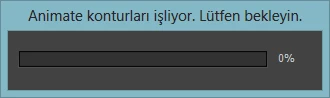

                                    

This topic has been closed for replies.
Correct answer kglad

reset your preferences -

  https://helpx.adobe.com/animate/kb/animate-cc-crashes-on-launch-startup.html

    (or remove Win:  C:\Users\<username>\AppData\Local\Adobe\Animate CC <version>\ and

                                  C\Users\<username>\AppData\Roaming\Adobe\Animate\<version>\

                        Mac:   /Users/<username>/Library/Application Support/Adobe/<Animate CC version>/ and

                                    /Users/<username>/Library/Preferences/Adobe/Animate/<version>/)

1 reply

kglad
Community Expert
kgladCommunity ExpertCorrect answer
Community Expert
August 11, 2019

reset your preferences -

  https://helpx.adobe.com/animate/kb/animate-cc-crashes-on-launch-startup.html

    (or remove Win:  C:\Users\<username>\AppData\Local\Adobe\Animate CC <version>\ and

                                  C\Users\<username>\AppData\Roaming\Adobe\Animate\<version>\

                        Mac:   /Users/<username>/Library/Application Support/Adobe/<Animate CC version>/ and

                                    /Users/<username>/Library/Preferences/Adobe/Animate/<version>/)