
Participant
April 10, 2017
Answered

Animate Legacy Export not respecting Resolution setting

  • April 10, 2017
  • 1 reply
  • 556 views

Hi everybody!

I reinstalled Mac OS Sierra and installed the latest version of Animate from my Creative Cloud subscription. For exporting high DPI images, I've always used Animate's Export Image option (now Export Image (legacy)). Ever since I reinstalled Animate on my new OS reinstall, the resolution value when exporting via the Export Image (Legacy) dialog isn't being respected. All of my images are being exported at a default resolution of 72dpi even though my settings would indicate otherwise:
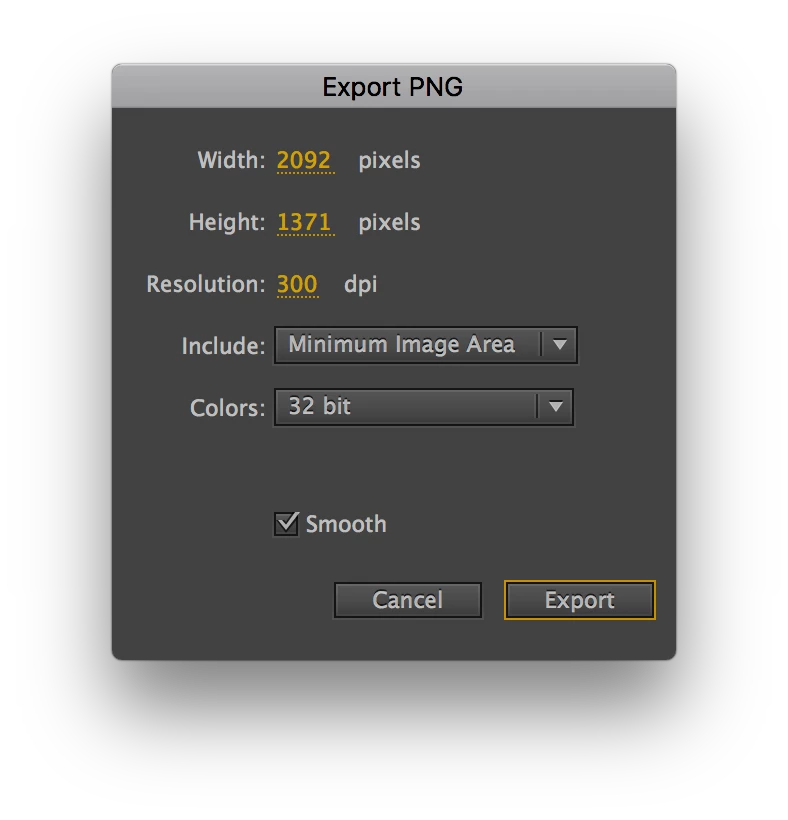
The strange thing is that everything worked 24 hours ago on the same version of Sierra and Animate that I am on right now. I even upgraded to the Sierra beta to see if that might resolve things, but it hasn't.

Anybody have any suggestions?

Thanks,

Kirupa

    This topic has been closed for replies.
    Correct answer Colin Holgate

    I tested in CS6, and things were the same there too. The DPI is really a convenience thing, where you can ask to get an image as if the stage was a different DPI. You'll notice that the width and height figures change. You do end up with a 72 DPI image, but it has more pixels, and if you printed at 300 dpi, a 72 dpi image that had been scaled up by over fours times would still have the same detail a same sized 300 dpi image would have.

    In the new image export there is the same idea, only there they went with the less confusing Resize percentage.

    1 reply

    Colin Holgate
    Colin HolgateCorrect answer
    Inspiring
    April 10, 2017

    I tested in CS6, and things were the same there too. The DPI is really a convenience thing, where you can ask to get an image as if the stage was a different DPI. You'll notice that the width and height figures change. You do end up with a 72 DPI image, but it has more pixels, and if you printed at 300 dpi, a 72 dpi image that had been scaled up by over fours times would still have the same detail a same sized 300 dpi image would have.

    In the new image export there is the same idea, only there they went with the less confusing Resize percentage.

    kirupacAuthor
    Participant
    April 10, 2017

    Colin - The bug is that the exported image doesn't actually contain more pixels. It is literally a 72dpi image and the low amount of pixels that go with it. The width and height look larger, but the exported image dimensions do not match that. This feature worked exactly as you describe yesterday

    I'll give the New Image export feature a shot. Thanks for that pointer.

    Cheers,

    Kirupa

    Preran
    Legend
    April 12, 2017

    Hi Kirupa,

    You can report bugs to the team directly using Feature Request/Bug Report Form

    Thanks,

    Preran