


Participating Frequently
November 14, 2019
Answered

Animate Masking bug/limitation?

  • November 14, 2019
  • 2 replies
  • 4275 views

Hi,


I'm trying to mask a layer with another animated movieclip in a masking layer. The masking layer is made up of a number of concentric circles that are scaling in relation to each other. The problem is that animate doesn't seem to consider the outer outlined circles in the mask (I've converted the outlines to filled shapes rather than strokes so it's not that I'm trying to mask with a stroke). Instead, animate masks using only the center filled circle.


(I've attached an image to help demonstrate what's going on)

Is this a limitation or a bug in Animate or am I doing something wrong?
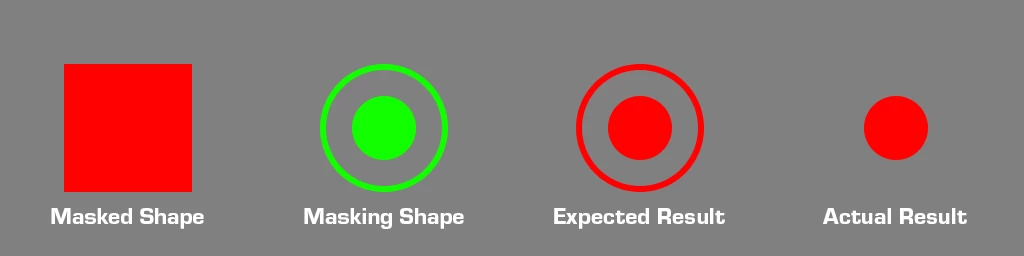
 

This topic has been closed for replies.
Correct answer n. tilcheff

I was actually able to get it to behave the way I expect by drawing a thin rectangle through the center of the clip intersecting all the circles and making them into a single contiguous shape. Obviously that's not ideal as it makes everything have a weirtd thin line through it, but may be a clue as to how to fix it?


My guess why after merging the layers it did not work straight away is that stupid Flash did not know what the shapes were because some were still selected.


All have to be broken apart and deselected.


You do this by choosing edit multiple frames, selecting everything, pressing Ctrl+B and then clicking outside to deselect.

There is no limitation on having mask that consists of unconnected shapes.


2 replies

n. tilcheff
Legend
November 15, 2019

Hi mate,


Make sure that the shapes you use as a mask are not two separate Drawing Objects. Break them apart down to raw vector shapes and it should work.


Nick - Character Designer and Animator, Flash user since 1998 | Member of the Flanimate Power Tools team - extensions for character animation
Participating Frequently
November 15, 2019

I'm not sure exactly what you mean by "Separate Drawing Objects". The 3 circles are on separate layers, they're all shapes, and are animated using shape tweens. None of them are symbols.

n. tilcheff
Legend
November 15, 2019

Hi mate,


You should have started with this screenshot and you would have gotten your answer right away.


Only one layer in a symbol can work as a mask and that is the bottom layer.

This is not a bug. It's by design and used widely in the animation industry in various situations.


Also on the one layer you can have multiple closed shapes, but they should either be raw vector or a single drawing object. If the individual shapes are each an individual Drawing Object only the first one works as mask (This is what I assumed you had as you omitted important information in your first post.)


In your case, you have to convert your ripple effect to frame by frame animation and merge those layers to be able to use as a mask. That's all.


Hope this helps!


Nick - Character Designer and Animator, Flash user since 1998 | Member of the Flanimate Power Tools team - extensions for character animation
Legend
November 14, 2019

Let me guess... HTML5 Canvas document?

Participating Frequently
November 15, 2019

How do I check the document type?

Participating Frequently
November 15, 2019

Ok, I can't find anywhere in the application where it explicitly states what kind of document it is, but when I go to publish settings, it all seems to be set to actionscript, and the "Convert to" menu offers HTML 5 as an option but not actionscript, so I'm assuming this is actually an AS3 canvas? Maybe?
