
Animate menu UI bugs - menu items' sensor area bugs
Hi,
I'm not sure what the hover and click areas are called in UI elements.
Ever since I downloaded and started to use Adobe Animate a few months ago it feels like the UI interaction is not in line with the actual elements of the UI, specifically the top menu bar.
I have a screenshot to try and show what's the issue.
Unfortunately, my cursor isn't visible on the screenshot, but I was actually hovering on 'Debug' menu and the 'Help' drop-down opens. When I specifically click on one it opens that one but suddenly it jumps 2 or 1 menus to the right and opens that one.
I always have to be careful where I hover otherwise it never opens the menu I actually need.
To make it more fun, once it opened down I have to move the cursor on top of the drop-down menu otherwise it closes.
Actually here's a video, hopefully you can play it.
https://www.loom.com/share/9b999b3cf41b4995a852d6593dd1b58a?sid=a46990a3-987e-48a3-9b22-8277995c6941
Any solution for this? For help, this only happens on my large curved monitor.
Thanks!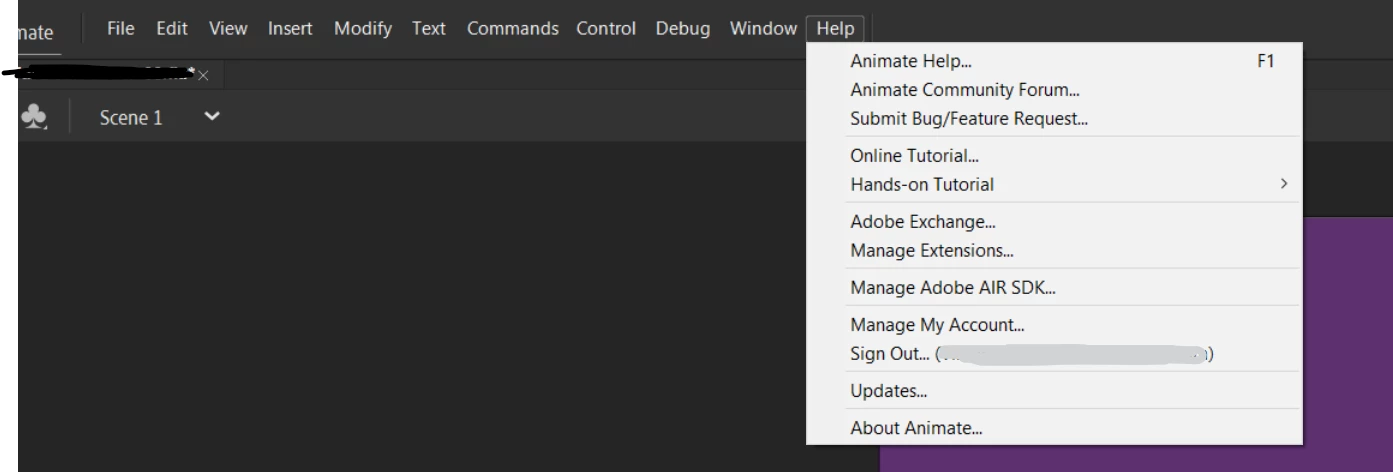


 AdChoices