Participating Frequently
April 4, 2019
Answered

Animate not exporting .mov

  • April 4, 2019
  • 6 replies
  • 3171 views

When I try to export the .fla file as a .mov file it exports it as a 2 GB file

that can't be opened by Quicktime. I have exported the original version

of this before. I made some changes and now this happens.

Can you help?

    This topic is closed to new replies. Start a new post to keep the conversation going.
    Correct answer n. tilcheff

    Hello!

    I'm not sure exactly what the specific issue is with Quicktime not working since I'm on a Windows machine, but that huge MOV is most likely uncompressed lossless video or using a codec that is missing.

    Choose "Convert video in Adobe Media Encoder" and there go for h.264 compression that will produce an MP4 file.
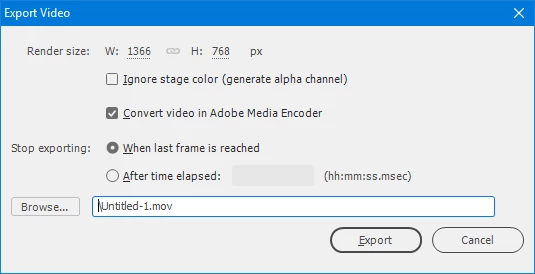
    Better yet, export a 24bit PNG sequence and render video out of that in Premiere or similar. This will ensure you get no dropped frames and best quality input.

    Good luck!

    6 replies

    Participant
    July 22, 2020

    The issue for me was it was trying to export to a folder that didn't exist. F if Adobe threw a warning message about that instead of it literally just not doing anything.

    evjamieAuthor
    Participating Frequently
    April 21, 2019

    Exported to Media Encoder. But somehow the audio got lost when it is converted in Quicktime.

    I didn't use to have this problem. Any ideas? Thanks for helping.

    n. tilcheff
    Legend
    April 22, 2019

    Have you checked your Media Encoder settings to make sure sound is enabled?

    Nick - Character Designer and Animator, Flash user since 1998 | Member of the Flanimate Power Tools team - extensions for character animation

    Asymetrical
    Inspiring
    April 4, 2019

    Yeah I agree, the best way I have found is to choose to let Adobe Media Encoder export out the final file. That uncompressed one I just toss out once Media Encoder exports out an mp4

    evjamieAuthor
    Participating Frequently
    April 13, 2019

    Thanks to everyone who offered help.

    On Wed, Apr 10, 2019 at 10:48 AM prerank28948274 <forums_noreply@adobe.com>

    n. tilcheff
    n. tilcheffCorrect answer
    Legend
    April 4, 2019

    Hello!

    I'm not sure exactly what the specific issue is with Quicktime not working since I'm on a Windows machine, but that huge MOV is most likely uncompressed lossless video or using a codec that is missing.

    Choose "Convert video in Adobe Media Encoder" and there go for h.264 compression that will produce an MP4 file.

    Better yet, export a 24bit PNG sequence and render video out of that in Premiere or similar. This will ensure you get no dropped frames and best quality input.

    Good luck!

    Nick - Character Designer and Animator, Flash user since 1998 | Member of the Flanimate Power Tools team - extensions for character animation


