


perinus
Inspiring
Nov 17, 2020 9:23 AM UTC
Question

Animate UI 2020 2021

Hello guys,

I have been working on animate/flash for 20 years now and I must say that the new interface poses a big workflow problem. I am forced to work on the 2019 version.
I saw on the forums the disappointment of some like me and that the necessary would be done for this new 2021 version but it is not. the problem still exists.
have you planned a fix for this because it worries me?
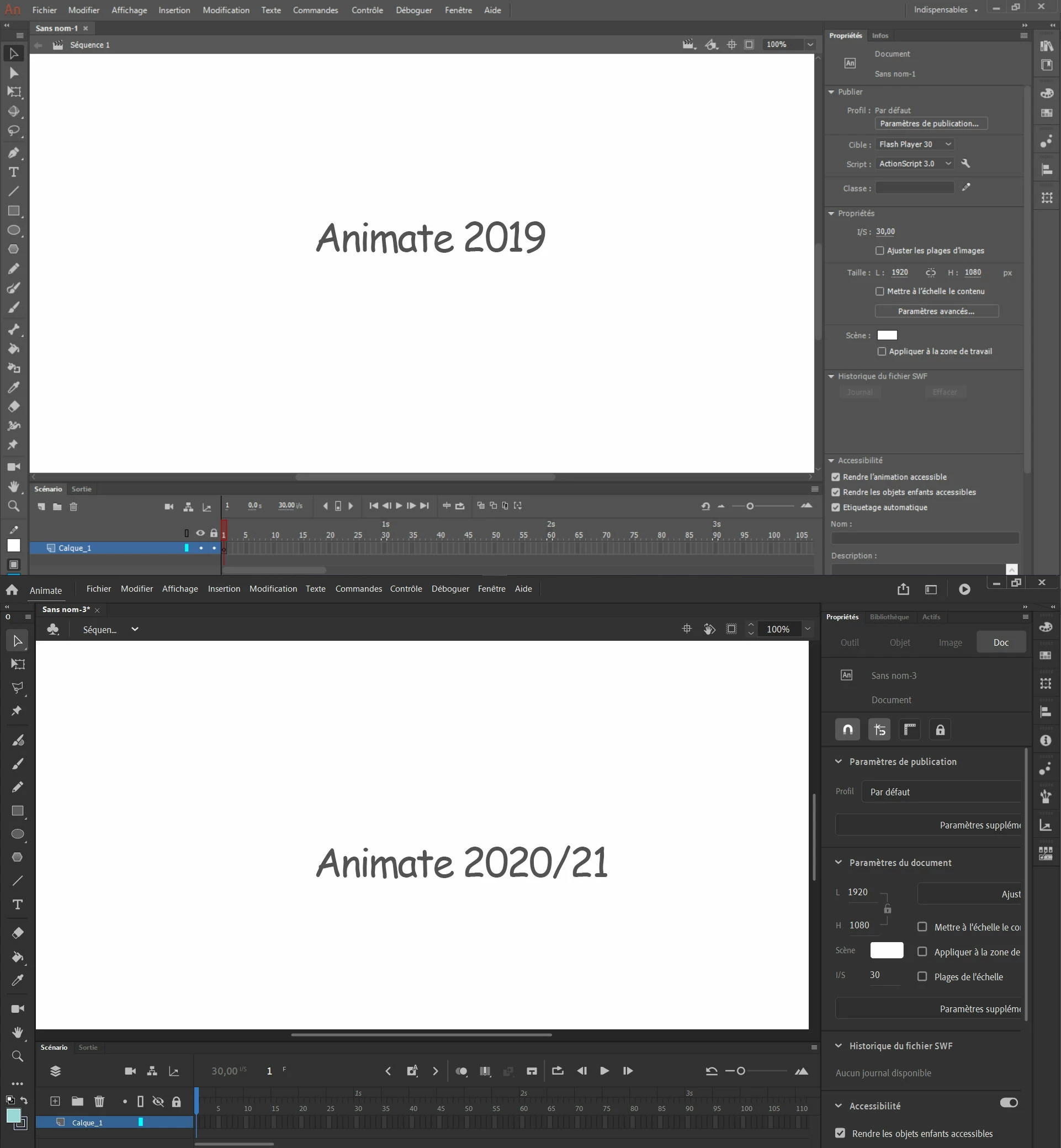
 

thank you for enlightening me !

bye !

    This topic is closed to new replies. Start a new post to keep the conversation going.

    13 replies

    _keyframer
    Community Expert
    Community Expert
    Nov 19, 2020 7:36 PM UTC

    I watched both videos and I also don't fully understand the complaint. The are the panels are using seem very similar to me. Is it the layout or the spacing?

    Translate
    Animator and content creator for Animate CC
    perinus
    perinusAuthor
    Inspiring
    Nov 23, 2020 3:58 PM UTC

    Sorry for my lack of clarity, I will try to be more precise.

    In the video of Animate 2021, I show how I have to pull on the property panel to access certain options (little pencil) such as movement settings. I do not understand why the elements of the panel do not fit when the panel is smaller.


    Translate
    perinus
    perinusAuthor
    Inspiring
    Nov 26, 2020 2:20 PM UTC

    Hey there is somebody how have the same problem, take a look, maybe he explains better than me

    https://community.adobe.com/t5/animate/properties-panels-interface-doesn-t-resize-properly/m-p/11628308?page=1#M337954

    Translate
    kglad
    Community Expert
    Community Expert
    Nov 17, 2020 4:33 PM UTC

    i think you should wait to see if someone else can better understand what you're trying to convey. 

    Translate
    Participant
    Nov 27, 2020 12:18 AM UTC

    The problem is the interactive part of the panel is too large and doesn't fit in the panel itself. You can see it goes off the border. In 2020, it would instead be resized alongside the panel so this would never happen, same as what the swatches do when you make the panel narrower. Right now, we have to make the panel really wide to be able to see the full sliders and range of options and it is a disaster for the workflow. If you know of any Windows options to sort this out, would you mind explaining how to do it? 

    Translate
    kglad
    Community Expert
    Community Expert
    Nov 17, 2020 2:54 PM UTC

    i don't see any difference in width and maybe a slight different in height (and both are adjustable within limits).


    in any case, with 20 years experience you probably know as much as i do about adjusting and customizinig the panels so if it doesn't work for you, it doesn't work for you. 


    but if you can be more precise about what you don't like, you can make suggestions to adobe here, https://www.adobe.com/products/wishform.html

    Translate
    perinus
    perinusAuthor
    Inspiring
    Nov 17, 2020 4:18 PM UTC

    Maybe it will help to understand my problem

    But maybe I don't know how to customize the panels actually


    Translate
    Participant
    Mar 11, 2021 12:43 PM UTC

    Got the same issue , (Animate 21 / windows 10)
    but if I change view in /Window/ Work Space / change from  something like "Little screen" (my UI is in french), to "standard", I can change the width of the properties panel, it's still cut (right part of buttons and selectors hidden )  but It's less annoying.
    Hope this helps

    Translate
    kglad
    Community Expert
    Community Expert
    Nov 17, 2020 2:32 PM UTC

    i don't know what differences you're trying to show though the most obvious differences in your screenshot are customizable (windows>workspaces) so the panel layouts in the two would be identical.


    Translate
    perinus
    perinusAuthor
    Inspiring
    Nov 17, 2020 2:42 PM UTC

    I'm talking about that, why it is so big ? 

    Translate