

Jeffery.Wright
Inspiring
May 29, 2025
Answered

Animate v2301 HTML5 Canvas placing variables in wrong dynamic text locations

  • May 29, 2025
  • 2 replies
  • 1644 views

On a frame I have 5 Dynamic Text objects:
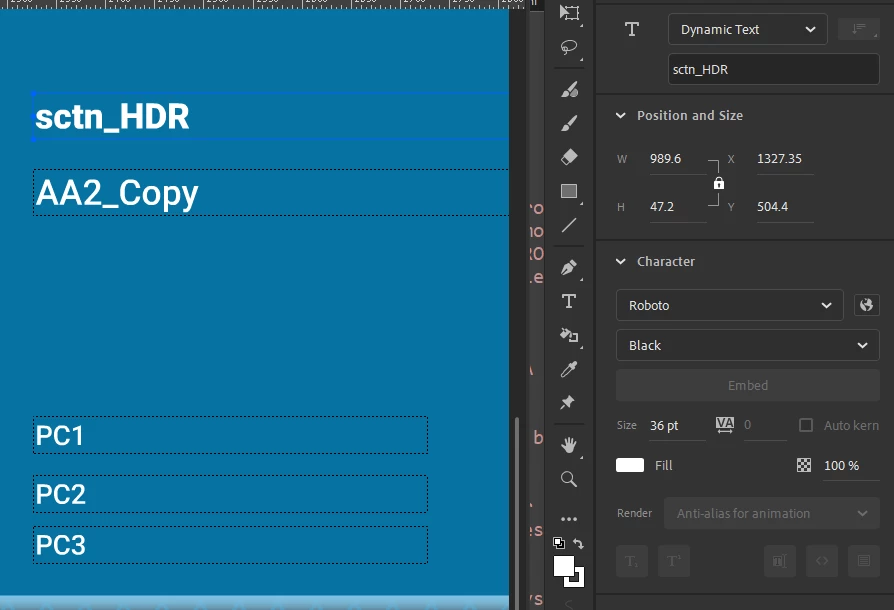
On that frame I am directing variables to populate these objects:

this.sctn_HDR.text = sctn_AA2A;
this.AA2_Copy.text = AA2_copy;

this.PC1.text = AA2_PC1;
this.PC2.text = AA2_PC2;
this.PC3.text = AA2_PC3;

These are the varible strings:

sctn_AA2A = "SciLog Cryobag Filler System";
AA2_copy = "The SciLog Cryobag Filler...";

AA2_PC1 = "Single Use Sensors & Monitors";
AA2_PC2 = "Single Use Assemblies";
AA2_PC3 = "Bioprocess Containers";


So, what's the deal with this misplacement of the variables I assigned? 



Why is Animate making my variables appear where I did not indicate? 


Why, for example, is PC3 not displaying the string I assigned to it? 


Advanced layers on or off makes no difference. 


Anyone else running into this issue? 


Thanks.


Correct answer kglad

How did you do it? What did I miss? Yoou're a miracle worker!


all those dynamic textfields were in a problematic layer.  why it is problematic, i don't know.  it may have been a guide layer previously or a camera layer or hidden or something else.  or maybe that keyframe was the problem.  it could have been part of a tween or something else.


i didn't search the fla history trying to figuire it out.


anyway, i moved those 5 or so textfields to the layer above.  i changed nothing else.  i group selected them, cut and pasted in place after creating a blank keyframe in the above layer.

2 replies

JoãoCésar17023019
Community Expert
Community Expert
May 29, 2025

Hi.


Have you double-checked in the Properties panel if the instances names are assigned as you expected? Or maybe if you have other hidden/forgotten instances with the same name?

Please let us know.


Regards,

JC

Jeffery.Wright
Inspiring
May 29, 2025

The properties are correct, I always place the instance name in the field as a placeholder for clarity.


What could possibly cause variables I assigned to appear where I didn't assign them? It's crazy. 


Thanks. 


kglad
Community Expert
Community Expert
May 29, 2025

do the dynamic textfields exist (even if differently named) on any frame prior to the frame with code?

kglad
Community Expert
Community Expert
May 29, 2025

use console.log to debug 

Jeffery.Wright
Inspiring
May 29, 2025

Thanks, I have and it makes no sense. 


Uncaught TypeError: Cannot set properties of undefined (setting 'text')


this.PC2.text = AA2_PC2;


PC2 does exist and so does the variable. Nothing about the console log is helpful. 

I tested this in Animate 2205 with the same results. 


What on Earth could be the issue? 


Thanks again.